Summary
Analysis score
Average of the criteria rated below
Value for money: where the P62 Pro sits in the market
Design and installation: practical more than flashy
Build, longevity and customer support
Image performance: brightness, focus and smart features
What the WiMiUS P62 Pro offers on paper
Daily usability: how well it serves as a "TV replacement"
Pros
- Bright 800 ANSI lumens with native 1080p and HDR10, suitable for evening use and tolerable in moderately lit rooms
- Built-in official Netflix, Prime Video, YouTube and other apps with Wi‑Fi 6, reducing the need for external streaming sticks
- Convenient auto focus, auto keystone and good connectivity (2× HDMI, 2× USB, Bluetooth 5.2, HDMI ARC/CEC, 3.5 mm) plus decent Dolby speakers
Cons
- No optical zoom and heavy reliance on digital keystone can cause some softness and small artifacts at extreme angles
- Smart OS has minor quirks (pointer navigation in certain apps, occasional Wi‑Fi reconnection issues) that may annoy picky users

Specifications
View full product page →| Brand | WiMiUS |
A home cinema projector that tries to do everything
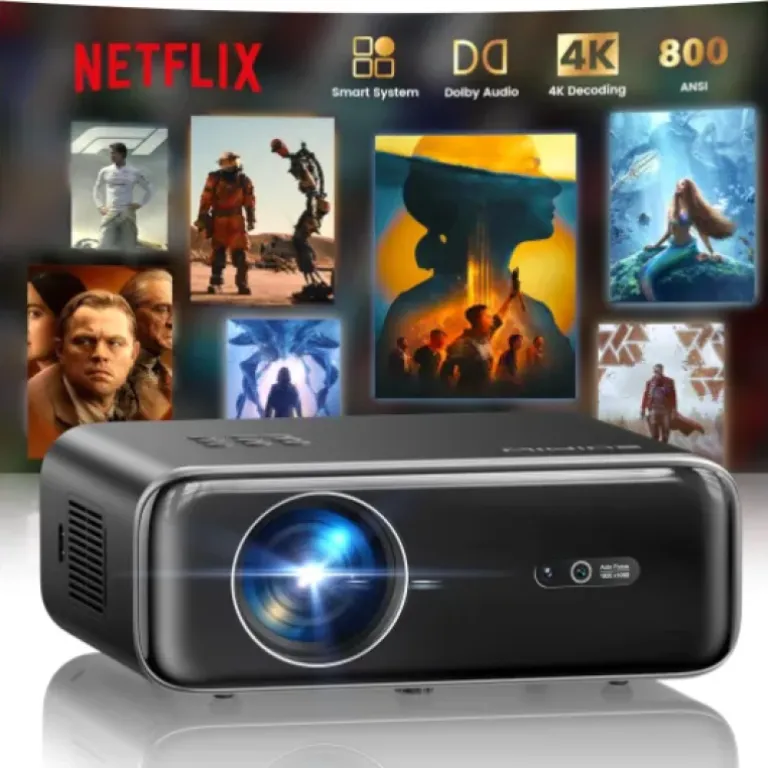
The WiMiUS P62 Pro positions itself as a complete home cinema solution: native 1080p, 800 ANSI lumens, integrated smart OS with official apps, Wi‑Fi 6, Bluetooth 5.2, Dolby Audio, and automatic image adjustments. On paper, it tries to cover almost every use case: living room movie nights, occasional outdoor sessions, gaming, and even a bit of business or education projection thanks to the HDMI and USB inputs. With a 4.7/5 average rating from over 2,000 Amazon reviews, buyers seem largely satisfied with the balance between price, brightness, and features.
Compared with many cheap LED projectors, the P62 Pro stands out mainly on three fronts: the advertised 800 ANSI lumens, the presence of official Netflix/Prime Video/YouTube apps, and the full set of auto focus/auto keystone/smart obstacle avoidance tools. Several customer comments highlight that these automation features are not just marketing lines: they describe quick focus and geometry correction even when the projector is at an angle or moved around.
The spec sheet also pushes the audio side: dual 10W speakers with Dolby support, two‑way Bluetooth, and HDMI ARC for use with soundbars or AV receivers. For a product that weighs about 5.4 lb and measures roughly 30 × 25 × 8.5 cm, it aims to be both a standalone cinema box and a central hub in a more serious setup. According to buyers, it generally holds up in both roles, even if some choose to add an external sound system.
It’s not perfect: a few reviews mention small software quirks (Wi‑Fi reconnection issues, slightly clumsy navigation in some apps, and some softness in corners when keystone correction is pushed hard). But overall, the combination of brightness, smart features, and connectivity gives it a solid place among mid‑range home projectors. In my opinion, it targets users who want something more serious than entry‑level mini projectors, without paying the premium of big brands like Epson or BenQ.
Value for money: where the P62 Pro sits in the market
The exact price is not displayed here, but judging from its positioning and feature set, the WiMiUS P62 Pro clearly aims at the mid‑range segment: more expensive than entry‑level 720p or low‑brightness 1080p projectors, but below established big‑brand home cinema models. In that context, the spec sheet is dense: 800 ANSI lumens, native 1080p with 4K input support, HDR10, Wi‑Fi 6, two‑way Bluetooth, official Netflix/Prime/YouTube, Dolby Audio with dual 10W speakers, two HDMI and two USB ports, HDMI ARC/CEC, auto focus, auto keystone, smart obstacle avoidance, and a generous warranty.
Compared to many similarly priced competitors, two aspects stand out in terms of value. First, the presence of official streaming apps built into the projector. A lot of cheap “smart” projectors have limited, buggy, or semi‑legal app support, forcing buyers to add a Fire TV or Roku anyway. Here, several reviews confirm that the built‑in apps actually work, with decent speed and support for high‑definition content. Second, the auto image features (focus, keystone, alignment) save time and make the device usable even in rooms where you can’t place the projector perfectly in front of the screen.
On the downside, there are some trade‑offs. The lack of optical zoom means you rely on placement and digital zoom, which is less flexible than what you get on more expensive home cinema projectors. Some corners can get soft if you push keystone too far. The smart OS, while generally appreciated, still has small quirks: pointer‑style navigation in Disney+, occasional Wi‑Fi reconnection issues, and app organization that isn’t always intuitive. For a purist who only cares about the cleanest image and plans to use an external streaming device anyway, a non‑smart projector from a traditional brand might be more appealing, even if it means sacrificing integrated apps.
For most buyers described in the reviews, though, the overall package seems to justify the cost. They describe it as good or very good value, especially given the brightness level and sound quality. In my opinion, the P62 Pro offers strong value for someone who wants a large, bright image with minimal setup and is happy with 1080p rather than native 4K. It’s less suited to users who want professional‑grade calibration options or who are very sensitive to the limitations of digital keystone and smart TV interfaces.
![[Built-in Official Apps/4K Support] Smart Outdoor Projector with WiFi and Bluetooth, 800ANSI Movie Projector, DoIby Audio with Dual Speaker, Auto Focus w/ YouTube&PrimeVideo Proyector, Upgrad P62 Pro Standard Black](https://www.digital-camera-guru.com/storage/677458/conversions/81GBqwrIy-L._AC_SL1500_-medium.webp)
Design and installation: practical more than flashy
The P62 Pro comes in a classic black housing with dimensions of about 11.8 × 9.8 × 3.35 inches (30 × 25 × 8.5 cm) and a weight of roughly 5.4 lb (2.45 kg). So it’s not a tiny pico projector, but more of a compact home cinema unit that you can still move between rooms or take to a friend’s place if needed. One Italian buyer mentions a practical backpack for transport in their package, while the official description for this specific version clearly states there is no carrying case included, so this may depend on region or bundle and shouldn’t be taken for granted.
From a pure layout point of view, the design seems focused on ease of use: there are physical control buttons on the top, which one reviewer with young kids really appreciates because remotes tend to disappear or break. That’s a small detail, but many modern projectors rely only on the remote, which can be a pain in daily life. The front hosts the lens and a small camera that handles auto focus and auto keystone, while the bottom has four M5 screw holes and a central M6 screw, making it compatible with ceiling mounts, tripods, or simple table placement.
Buyers describe setups ranging from living room walls at 2.5–3.5 m to larger distances up to around 4 m and beyond. One user reports using it at about 14 feet, even though the official recommendation is 6.5–12 feet, and still being satisfied with clarity and screen size. Another review in Spanish mentions placing it at a 20–30° horizontal angle relative to the wall and relying on keystone correction to get a clean 16:9 image. This confirms that the design and mounting options leave plenty of room to adapt to imperfect rooms.
Visually, nothing in the comments suggests a premium designer object; it’s more a functional black box that blends into the background. In my opinion, that’s fine for a projector: once the lights are off, looks hardly matter. What counts is that placement, adjustment and control are straightforward, and on that front the physical buttons, multiple mounting points, and auto‑adjustment camera are strong points of the design.
Build, longevity and customer support
Durability is always tricky to judge without long‑term data, but a few elements give some clues. First, the P62 Pro is described as an upgrade of a previous P62 model that reportedly had a low return rate. The manufacturer insists on using new DDR memory components instead of refurbished parts, which, if true, should reduce the risk of early failures related to storage or system instability. The projector’s size and weight also suggest a more substantial build than ultra‑compact pico devices, which often sacrifice cooling or structural rigidity.
Among the published reviews, there are no widely reported catastrophic failures or recurring defects mentioned in the excerpts here. Instead, one Italian buyer mentions having used the projector for months, being satisfied with the image quality and reliability, and praising the assistance as "available, expert and very fast". Others refer briefly to helpful customer service. That matches the brand’s official after‑sales promises: 24/7 support, a 2‑year money‑back guarantee, 3‑year repair coverage, and lifetime technical support. For a mid‑range projector, this is above average and tends to indicate that WiMiUS is confident enough in the hardware to back it with a long safety net.
Cooling and noise can also affect longevity. The spec sheet highlights a noise level below 30 dB, and at least one buyer mentions that they barely hear the projector when content is playing, even when sitting close. Quiet operation usually goes hand in hand with reasonably sized fans and proper airflow. While nobody in the quoted reviews goes into technical detail about heat, the absence of repeated complaints about overheating, auto‑shutdowns, or fan failure is a positive sign.
Of course, no device is bulletproof. In my opinion, the realistic view is that the P62 Pro offers reassuring coverage if something goes wrong, but its long‑term durability will still depend on basic care: avoiding dusty environments, letting it cool before moving, and not blocking vents. Compared to cheaper no‑name projectors with minimal or vague warranties, this model looks safer for someone who wants to keep a projector for several years rather than treat it as a disposable gadget.
![[Built-in Official Apps/4K Support] Smart Outdoor Projector with WiFi and Bluetooth, 800ANSI Movie Projector, DoIby Audio with Dual Speaker, Auto Focus w/ YouTube&PrimeVideo Proyector, Upgrad P62 Pro Standard Black](https://www.digital-camera-guru.com/storage/677459/conversions/61LnJizZedL._AC_SL1500_-medium.webp)
Image performance: brightness, focus and smart features
The key performance promise of the WiMiUS P62 Pro is its combo of 800 ANSI lumens, native 1080p resolution, HDR10 support, and AI‑driven image adjustments. Several buyers explicitly highlight that the projector is much brighter than older models they owned, and that the picture is "very bright and crisp" for evening and nighttime viewing. One English‑language review even shares photos taken during a sunny afternoon in a bright Florida living room; they note that while the brightest mode is clearly better than standard in daylight, both are usable, which lines up with what 800 ANSI lumens should deliver in real life.
On sharpness and geometry, the automatic tools seem to do most of the heavy lifting. Reviews repeatedly praise the auto focus and auto keystone correction, describing focus that snaps in quickly, and geometry correction that maintains a proper 16:9 rectangle even when the projector is moved or tilted. A Spanish buyer mentions projecting from about 2.5 m at a 20–30° angle and relying on horizontal keystone to obtain a roughly 77‑inch image; they do note that if keystone is pushed too far, some zones become a bit blurry and a faint “ghost” of the original image can appear in very dark scenes. That’s consistent with what digital keystone usually does: it’s very convenient, but it inevitably degrades sharpness toward the edges when extreme angles are used.
Color and contrast are less detailed in the comments, but general wording is positive: people talk about "gorgeous, glorious color" for sports and films and a cinema‑like feel at night. With HDR10 support and two brightness levels, the projector should handle most streaming and Blu‑ray content decently, even if nobody should expect the contrast of a high‑end DLP or a dedicated cinema projector. The fact that people use it both for movies and gaming, without complaining about unbearable input lag in the quoted reviews, suggests latency is acceptable for casual console play, though serious competitive gamers might still prefer a display with a specific low‑latency mode.
In terms of smart performance, the integrated apps get good feedback overall. One reviewer calls the UI fast and responsive and says the apps handle ultra‑high‑definition online content properly. Another notes that Plex runs smoothly, while Disney+ uses a pointer‑style navigation that feels clumsier than typical TV interfaces. There are a few small software quirks reported, like occasional Wi‑Fi recognition issues that disappear after unplugging and plugging the projector back in, or minor app organization oddities (Plex not appearing under "My App"). These seem like annoyances rather than deal‑breakers. In my opinion, for a projector in this category, the overall performance picture is solid: bright enough for mixed use, sharp at reasonable angles, and smart features that are more mature than many rivals, even if not perfect.
What the WiMiUS P62 Pro offers on paper
The WiMiUS P62 Pro is a native 1920 × 1080 projector that can accept 4K signals (“4K supported” in the product description) and downscale them to 1080p. The brand advertises 800 ANSI lumens, which is a more realistic brightness metric than the inflated "LED lumens" often seen on cheaper models. It supports HDR10, has two brightness modes (High and Standard), and offers a zoom from 50% to 100%. That zoom is digital, not optical, so reducing image size will in theory sacrifice some effective resolution, but it adds flexibility when placement is not ideal.
On the smart side, it runs its own OS with an app store, a web browser, and preinstalled streaming apps. Crucially, several reviews confirm that Netflix, Prime Video, and YouTube are officially integrated and work directly on the projector, which avoids the usual headache of casting restrictions or the need for an external streaming stick. Wi‑Fi 6 support should help with stable 1080p or 4K input streaming, provided your home network is solid.
Connectivity is more generous than average in this price bracket: 2× HDMI, 2× USB‑A, 3.5 mm audio out, plus Bluetooth 5.2 and HDMI ARC/CEC. Buyers mention using the HDMI ports for consoles, laptops, and TV sticks like Fire TV, while the USB ports handle external drives with films, photos, and music. ARC is a nice touch for those who want to route audio to a soundbar or AV receiver with a single HDMI cable.
The brand also insists on reliability: they talk about using new DDR components instead of refurbished parts, and they back the product with a 2‑year money‑back guarantee, 3‑year repair coverage, and lifetime technical support. Among the Amazon comments, several people highlight responsive and efficient customer service, including quick help and follow‑up. In my view, this long warranty and the relatively high average rating suggest the projector is not plagued by systematic defects, even if no product is completely free of issues.
![[Built-in Official Apps/4K Support] Smart Outdoor Projector with WiFi and Bluetooth, 800ANSI Movie Projector, DoIby Audio with Dual Speaker, Auto Focus w/ YouTube&PrimeVideo Proyector, Upgrad P62 Pro Standard Black](https://www.digital-camera-guru.com/storage/677460/conversions/71-xprpVwrL._AC_SL1500_-medium.webp)
Daily usability: how well it serves as a "TV replacement"
Effectiveness here means: does the P62 Pro actually replace a TV or older projector in daily life without turning into a constant hassle? Judging by the reviews, it does a good job. Multiple buyers describe it as turning their living room into a movie theater, with kids asking for movie nights all the time. One reviewer explicitly compares it to a projector they owned in 2008 and says the difference is huge in terms of brightness, image quality, and sound. Others mention using it for a mix of movies, TV series, YouTube, and even concerts or K‑pop performances, all via the built‑in apps or an external Fire TV stick.
What makes it practical is the combination of smart OS + auto adjustments + decent speakers. People report that setup is quick: plug it in, connect Wi‑Fi, log into Netflix or YouTube, and you’re ready. The auto focus and auto keystone mean you don’t spend time fiddling with the settings each time you move the projector or adjust distance. One buyer even mentions using it at a distance outside the recommended range and still getting a clear, very large image. That kind of flexibility helps when your room layout is less than ideal.
On the audio side, several reviews say the built‑in Dolby speakers are the best they’ve heard on a projector in this segment and loud enough for a medium‑size living room. Others prefer to connect a soundbar or external system via HDMI ARC or Bluetooth, but they generally describe the internal audio as more than adequate. There is also a 3.5 mm jack for wired speakers or headphones. Fan noise is mentioned as low: one Spanish buyer says they sit 1–2 m from the projector and can barely hear it once a film is playing, which suggests the advertised <30 dB figure is plausible in real use.
There are, however, some limits. When keystone correction is pushed hard (strong horizontal angle), one review notes some blur in corners and slight ghosting in very dark scenes. Another user reports occasional Wi‑Fi detection issues that require a quick power cycle. And while the zoom lets you reduce image size when the projector is too far, at least one buyer regrets the lack of a zoom that can enlarge the image when placed close to the wall. In my opinion, though, these are relatively minor compromises compared with the convenience of the all‑in‑one package. For many households, the P62 Pro looks effective enough to become the main screen for films and series, especially in rooms where a huge TV would be too expensive or impractical.
Pros
- Bright 800 ANSI lumens with native 1080p and HDR10, suitable for evening use and tolerable in moderately lit rooms
- Built-in official Netflix, Prime Video, YouTube and other apps with Wi‑Fi 6, reducing the need for external streaming sticks
- Convenient auto focus, auto keystone and good connectivity (2× HDMI, 2× USB, Bluetooth 5.2, HDMI ARC/CEC, 3.5 mm) plus decent Dolby speakers
Cons
- No optical zoom and heavy reliance on digital keystone can cause some softness and small artifacts at extreme angles
- Smart OS has minor quirks (pointer navigation in certain apps, occasional Wi‑Fi reconnection issues) that may annoy picky users
Conclusion
Analysis score
The WiMiUS P62 Pro looks like a solid mid‑range projector for people who want a real home cinema feel without diving into high‑end gear. On paper, the combination of 800 ANSI lumens, native 1080p with 4K input, HDR10, Dolby Audio, and a full smart platform with official Netflix/Prime/YouTube gives it clear advantages over many budget alternatives. The Amazon comments back this up: buyers talk about a bright, crisp picture, very convenient auto focus and keystone, and speakers that are usable without an external sound system.
It’s not flawless. Digital keystone and the lack of optical zoom limit flexibility for perfect image quality, and the smart OS still has some small annoyances (pointer‑style navigation in some apps, occasional Wi‑Fi hiccups). But the extensive connectivity (2× HDMI, 2× USB, Wi‑Fi 6, Bluetooth 5.2, HDMI ARC), quiet operation, and the long warranty with responsive support help balance those weaknesses. In my opinion, it suits families and movie fans who want an easy, all‑in‑one projector for the living room or a dedicated room, and who are fine with 1080p.
People who should probably look elsewhere are those chasing reference‑level image accuracy, native 4K, or who absolutely need optical zoom and minimal digital processing. For everyone else, especially if you value built‑in streaming and simple setup, the P62 Pro comes across as a practical and generally well‑received choice in its class.
![[Built-in Official Apps/4K Support] Smart Outdoor Projector with WiFi and Bluetooth, 800ANSI Movie Projector, DoIby Audio with Dual Speaker, Auto Focus w/ YouTube&PrimeVideo Proyector, Upgrad P62 Pro Standard Black](https://www.digital-camera-guru.com/storage/677458/81GBqwrIy-L._AC_SL1500_.jpg)