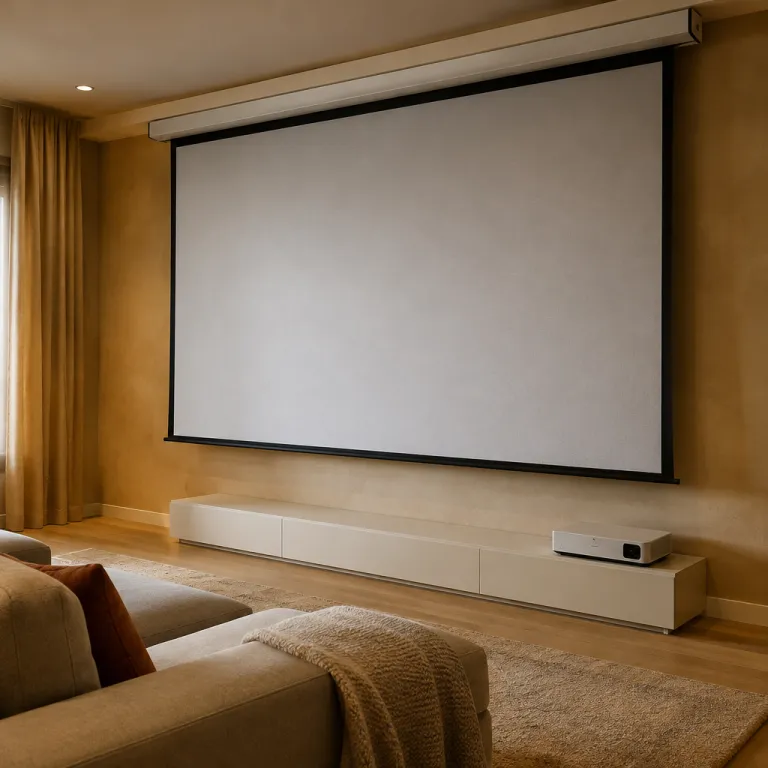
Understanding motorized projector screens
What Makes Motorized Projector Screens Stand Out?
Motorized projector screens have become a popular choice for home theater enthusiasts who want a seamless, high-quality viewing experience. Unlike manual screens, these models use a motor to raise or lower the screen with the push of a button or remote control. This feature not only adds convenience but also helps protect the screen material from dust and accidental damage when not in use. Whether you’re considering a ceiling-mounted or floor rising design, motorized screens offer a clean, modern look that fits well in most home theater setups.
Types and Configurations
There are several types of motorized projector screens to consider. Ceiling-mounted screens are the most common, retracting neatly into a case when not in use. Floor rising screens, such as the popular Yard Master models, are ideal for rooms where ceiling installation isn’t practical. Some screens, like the elite screens Aeon series, feature a fixed frame with a motorized masking system for enhanced image control. The choice depends on your room layout, projector type (including short throw and ultra short throw models), and personal preferences.
Screen Material and Performance
The quality of the screen material plays a crucial role in your viewing experience. Look for screens with a high gain if you need to boost brightness, especially in rooms with ambient light. Black backing helps prevent light penetration, improving image contrast. Some premium options, like ALR (ambient light rejecting) screens, are designed to maintain image quality even in well-lit spaces. For those interested in maximizing their home theater, exploring a 120-inch ALR screen can be a game changer for both size and performance.
Why Consider a Motorized Screen?
- Convenience: Easy operation with remote or wall switch
- Protection: Screen retracts to avoid dust and accidental damage
- Clean Aesthetics: Discreet installation, especially with ceiling or floor options
- Versatility: Works with a range of projectors, including ultra short throw and standard models
- Enhanced Experience: Supports various aspect ratios and sizes for the best image quality
Understanding these basics will help you navigate the wide range of options, from entry-level to more expensive elite models. As you continue your search, keep in mind the importance of screen size, gain, frame design, and material quality to ensure the best fit for your home theater.
Key features to look for in a motorized projector screen
What Makes a Motorized Projector Screen Stand Out?
When searching for the best motorized projector screen for your home theater, it’s easy to get overwhelmed by the options. The right screen can make a huge difference in image quality, ease of use, and overall viewing experience. Here are the most important features to consider before making your choice.
- Screen Material and Gain: The material of your projection screen affects brightness, color accuracy, and contrast. Gain refers to how much light the screen reflects back. A higher gain screen is great for rooms with some ambient light, but can reduce viewing angle. Matte white is a popular choice for its balanced performance, while grey screens help with black levels in brighter spaces.
- Size and Aspect Ratio: Choose a screen size that fits your room and matches your projector’s capabilities. Common aspect ratios are 16:9 for movies and 4:3 for presentations. Ultra short throw projectors may require a specific size aspect or frame to avoid image distortion.
- Motorized Mechanism: Look for a motorized screen that operates quietly and smoothly. Some models, like floor rising or ceiling mounted screens, offer flexible installation. Rising screens are ideal if you want a screen that disappears when not in use.
- Frame and Casing Quality: A sturdy frame ensures the screen stays flat and wrinkle-free. High-quality aluminum or steel casings protect the screen when retracted. Elite Screens and Yard Master are known for their durable frames and easy installation.
- Viewing Angle: A wide viewing angle ensures everyone in the room gets a clear image, even from the sides. This is especially important for larger home theaters or when using a gain screen.
- Compatibility: Make sure your screen works well with your projector type, especially if you have a short throw or ultra short throw model. Some screens, like the Elite Screens Aeon series, are designed for specific projector technologies.
- Price and Value: Motorized projector screens can be expensive, but higher price often means better build quality and features. Compare models from brands like Elite and Yard Master to find the best balance of price and performance for your needs.
For those interested in outdoor setups or flexible viewing spaces, inflatable screens can be a fun and practical alternative to traditional motorized screens.
Choosing the right combination of screen material, gain, and frame will help you get the most out of your projector and maximize your home theater experience. Remember, the best screen is the one that fits your space, your projector, and your viewing habits.
Installation tips for a seamless setup
Preparing Your Space for a Motorized Screen
Before installing a motorized projector screen, it’s important to assess your room layout and lighting. Consider the distance between your projector and the screen, ensuring the throw ratio matches your chosen screen size and aspect ratio. Ambient light can impact image quality, so opt for a screen material with the right gain to enhance brightness and contrast, especially if your room isn’t completely dark.
Mounting Options: Ceiling, Wall, or Floor Rising
Motorized screens offer flexibility in installation. Ceiling mounts are popular for a clean look, but wall mounting can be easier in rooms with limited ceiling space. Floor rising screens are ideal for spaces where permanent fixtures aren’t possible. Elite Screens and other brands offer models with sturdy frames and easy-to-use mechanisms, making setup straightforward. Always check the weight and dimensions of your screen to ensure your mounting surface can support it.
- Ceiling mount: Great for dedicated home theaters, keeps the screen out of sight when not in use.
- Wall mount: Useful for multi-purpose rooms, often easier to access for maintenance.
- Floor rising: Portable and space-saving, suitable for temporary setups or rooms with large windows.
Wiring and Power Considerations
Motorized projector screens require a power source. Plan your wiring route in advance to avoid visible cables. Some screens offer wireless remote controls, while others may need a wall switch or integration with smart home systems. If your projector uses a micro HDMI port, make sure you have the right adapter for seamless connectivity. For more details, check out this guide on choosing the right micro HDMI port adapter.
Ensuring a Flat, Wrinkle-Free Surface
Quality and image clarity depend on a perfectly flat screen. During installation, make sure the screen material is tensioned correctly, especially for larger sizes or ultra short throw projectors. Some premium models, like the Elite Screens Aeon or Yard Master series, feature tensioning systems to maintain a smooth surface and optimal viewing angle.
Final Checks for the Best Viewing Experience
After installation, test the motorized screen operation several times. Check for smooth movement, proper alignment, and that the frame sits flush with the wall or ceiling. Adjust the drop length to fit your projector’s image and room height. A well-installed motorized screen enhances your viewing experience, making every movie night feel like a trip to the cinema, even if the price feels a bit expensive compared to manual options.
Comparing popular brands and models
How Leading Brands Stack Up
When searching for the best motorized projector screen, comparing popular brands and models is essential. The market offers a range of options, from budget-friendly to premium, each with unique features that can impact your viewing experience.- Elite Screens: Known for their wide selection, Elite Screens offers both ceiling-mounted and floor rising motorized screens. Their "Spectrum" and "Aeon" series are praised for quality screen material, easy installation, and reliable motors. The "Yard Master" line is popular for outdoor use, but their indoor screens stand out for gain options and black backing to block ambient light.
- Vividstorm: Specializes in floor rising screens, especially for ultra short throw projectors. Their motorized projector screens are designed for easy setup and storage, making them ideal for rooms where a permanent frame is not possible. The screen material is engineered for high gain and wide viewing angles, enhancing image quality even in rooms with some light.
- Silver Ticket: Offers affordable motorized screens with solid build quality. While not as feature-rich as some premium brands, their screens provide a good balance of price and performance, with decent gain and aspect ratio options for most home theater setups.
- Screen Innovations: Focuses on high-end projection screens, including models designed to reject ambient light. Their "Solo" and "Zero Edge" series are more expensive but deliver exceptional image quality, especially in rooms where controlling light is a challenge. The frame and screen material are engineered for durability and a premium feel.
Key Comparison Points
| Brand | Screen Type | Gain | Viewing Angle | Price Range | Special Features |
|---|---|---|---|---|---|
| Elite Screens | Ceiling, Floor Rising | 1.1 - 1.3 | 160° | $$ | Wide size aspect options, black backing, easy install |
| Vividstorm | Floor Rising | 0.6 - 1.5 | 170° | $$$ | Ultra short throw compatible, portable, high gain |
| Silver Ticket | Ceiling | 1.1 | 160° | $ | Affordable, easy to use, basic features |
| Screen Innovations | Ceiling, Frame | 0.8 - 1.2 | 150° | $$$$ | Ambient light rejection, premium build, custom sizes |
What to Consider When Choosing
- Screen Material: Impacts gain, color accuracy, and viewing angle. High-quality materials improve image clarity and contrast.
- Motorized Mechanism: Look for smooth, quiet operation and reliability. Some brands offer remote control or smart home integration.
- Size and Aspect Ratio: Make sure the screen fits your space and matches your projector’s aspect ratio for the best viewing experience.
- Price vs. Features: Expensive screens often offer better materials and advanced features like ambient light rejection, but mid-range options can still deliver impressive performance.
Maintenance and care for longevity
Keeping Your Motorized Projector Screen in Top Shape
Regular care is essential to maintain the quality and longevity of your motorized projector screen. Even the best screens, whether ceiling-mounted or floor rising, need attention to deliver a crisp image and smooth operation over time.- Dust and Debris: Gently dust the screen material with a microfiber cloth. Avoid harsh chemicals, as they can damage the gain screen or leave streaks that affect the viewing experience.
- Motor and Mechanism: Run the motorized screen up and down occasionally, even if not in use, to keep the motor and frame in good working order. Listen for unusual noises or hesitations, which could signal a maintenance need.
- Ambient Light and Placement: Protect your projection screen from direct sunlight or strong ambient light, which can fade the screen material and reduce image quality. If you have a floor rising or ultra short throw setup, ensure the area is free from obstructions that might interfere with the screen’s movement.
- Screen Material Care: For high-gain or ALR (ambient light rejecting) screens, follow the manufacturer’s cleaning instructions. Some materials are more sensitive and require special care to preserve their reflective properties and viewing angle.
- Check the Frame and Mount: Inspect the mounting points, whether ceiling or floor, to ensure the screen remains securely attached. A loose frame can affect the aspect ratio and cause uneven rolling or rising.
Tips for Prolonged Performance
- Retract the screen when not in use to protect it from dust and accidental damage.
- Avoid touching the screen surface with fingers, as oils can degrade the material over time.
- If your projector screen is exposed to humidity, consider a dehumidifier to prevent mold or warping, especially for expensive or elite screens.
- For outdoor models like the Yard Master series, store the screen in a dry, safe place when not in use to extend its lifespan.
Maximizing your home theater experience
Optimizing Your Viewing Environment
To truly get the best out of your motorized projector screen, consider the environment where you watch movies or shows. Ambient light can have a big impact on image quality. If your room has a lot of windows or light sources, a screen with higher gain or special screen material designed for ambient light rejection can help maintain vibrant colors and deep blacks. Black backing on the screen also helps block light from behind, improving contrast.
Choosing the Right Screen Size and Aspect Ratio
The size aspect and aspect ratio of your projection screen should match your projector and viewing distance. A larger screen can be impressive, but make sure your projector can handle the size without losing image quality. Ultra short throw and short throw projectors work well with floor rising or ceiling-mounted screens, especially in smaller rooms. Always check the recommended viewing angle for your screen to ensure everyone gets a great view.
Fine-Tuning for the Best Image
- Adjust the screen height and frame so the center of the image is at eye level when seated.
- Use the projector’s settings to match the screen’s aspect ratio and gain for optimal brightness and clarity.
- For motorized screens, program the remote or wall switch for easy up and down control, making it simple to switch between viewing and everyday use.
Enhancing Audio and Visual Harmony
Pairing your motorized projector screen with quality audio equipment can elevate your home theater experience. Consider the placement of speakers in relation to the screen. Some screens, like the elite screens aeon or yard master series, offer acoustic transparency, allowing you to place speakers behind the screen without sacrificing sound quality.
Balancing Features and Price
While it’s tempting to go for the most expensive or feature-rich model, focus on what matters most for your space. Elite Screens, Yard Master, and other reputable brands offer a range of motorized projector screens with different materials, frame styles, and price points. Look for a balance between quality, ease of use, and your budget.
Regular Maintenance for Lasting Performance
Keep your screen material clean and dust-free to maintain image clarity. Follow the manufacturer’s care instructions, especially for motorized parts. This ensures your screen continues to deliver a premium viewing experience for years to come.