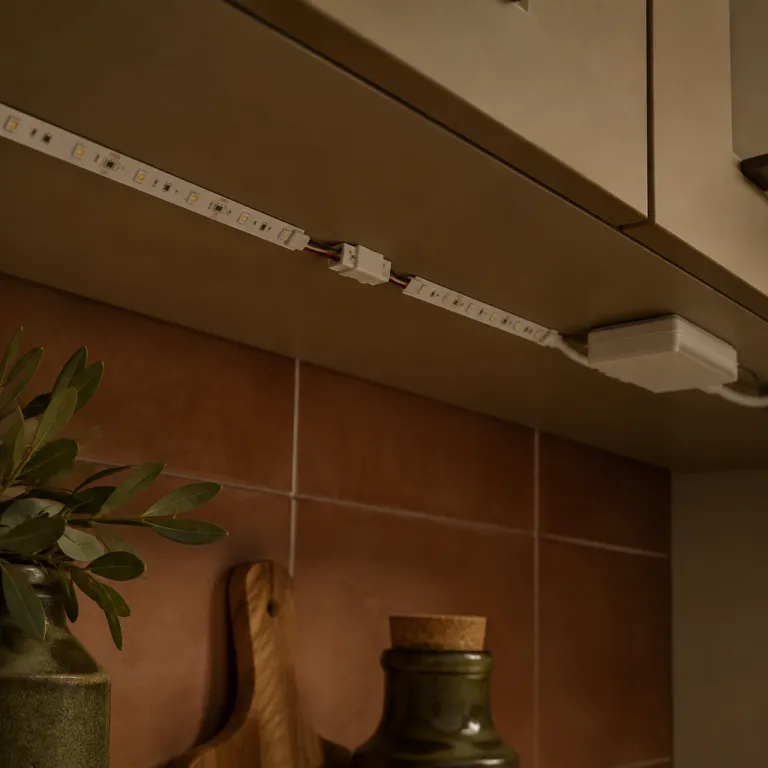
Understanding the role of LED connectors in smart lighting
Why connectors matter in smart lighting
When setting up smart lighting, connectors are the unsung heroes that make everything work smoothly. Whether you’re installing flexible LED strips under cabinets or adding RGB LED lights to your living room, the right connector ensures a reliable flow of power and data. Connectors link your LED strip lights to power sources, controllers, and even other strips, making it possible to customize your lighting setup for any space.
Connecting the dots: From LED tape to smart control
LED connectors come in many forms—solderless, waterproof, single color, and RGB options—each designed for specific needs. For example, waterproof LED strip connectors are essential for outdoor or bathroom installations, while solderless connectors make it easy for beginners to set up their lights without special tools. Strip connectors also help join multiple LED strips or connect strips to power supplies, ensuring seamless light across long runs or around corners.
Supporting flexible and efficient installations
Using the right connector not only simplifies installation but also supports the flexibility of your lighting design. With products like LED strip channels and tape, you can create clean lines and professional-looking results. Good connectors also help maintain the integrity of your LED lights, reducing the risk of flickering or power loss. This is especially important for RGB LED strips, where consistent color and brightness are key.
Enhancing reliability and safety
Choosing quality connectors for your LED strips and lights is about more than just convenience. Reliable connectors reduce the risk of loose wires, shorts, or overheating, which can impact both performance and safety. For those interested in learning more about the hardware that supports smart lighting, check out this guide on the role of light mounting brackets in smart lighting.
Looking ahead: More than just connections
As you plan your smart lighting project, remember that connectors are just one part of the puzzle. The next steps involve choosing the right type for your application, considering key factors like price, delivery, and compatibility, and learning how to install and maintain your setup for long-term performance.
Types of LED connectors for different smart light applications
Popular Connector Styles for LED Strips
When setting up smart lighting, choosing the right connectors is crucial for both performance and safety. LED strip connectors come in several styles, each designed for specific applications. Here are some of the most common types you’ll encounter when working with LED strips and strip lights:
- Solderless connectors: These are ideal for quick installations. Solderless connectors let you join LED strips without the need for soldering, making them perfect for DIY projects or rapid upgrades. They work well with both single color and RGB LED strips.
- Pin connectors: Pin LED connectors are used to connect flexible LED strips, especially when you need to bridge gaps or turn corners. They come in 2-pin (for white LED or single color strips) and 4-pin (for RGB LED strips) versions.
- Wire-to-strip connectors: These connectors allow you to attach a wire directly to your LED tape, which is useful for connecting strips to power supplies or controllers. They are available in waterproof and non-waterproof versions, depending on your lighting environment.
- Strip-to-strip connectors: Designed to join two LED strips together, these connectors are handy for extending the length of your lighting setup without soldering. They are available for both waterproof LED and standard LED strips.
- Strip channels and mounting accessories: While not connectors in the traditional sense, strip channels help secure your LED strips and improve heat dissipation. They also make your installation look more professional and can be paired with compatible connectors for seamless integration.
Matching Connectors to Your LED Product
Not all connectors are universal. The type of LED strip you choose—such as RGB, single color, or waterproof LED—will determine the compatible connector. For example, waterproof LED strips require connectors with a tight seal to prevent moisture ingress, while standard connectors are suitable for indoor LED light setups. Always check the product specifications, including the width of your LED tape and the number of channels or pins required.
Considerations for Power and Delivery
Proper connectors ensure efficient power delivery to your LED lights. Using the wrong connector can result in voltage drops, flickering, or even damage to your LED strips. When planning your setup, factor in the total length of your LED strip lights and the power requirements. This will help you select connectors that can handle the necessary current and maintain stable lighting performance.
For more technical details on wiring and compatibility, you can refer to this guide on understanding the essentials of wiring for LED lighting.
Key factors to consider when choosing an LED konnektor
What to Look for When Selecting LED Connectors
Choosing the right LED connector for your smart lighting setup can make a big difference in performance, durability, and ease of installation. Here are some key factors to keep in mind as you compare products and plan your project:
- Compatibility with LED Strips and Lights
Not all connectors fit every type of LED strip or tape. Check if your strip is single color (white LED) or RGB LED, and confirm the connector matches the number of pins (2-pin for single color, 4-pin for RGB). Also, ensure the connector supports the width and thickness of your LED strip or strip light. - Connector Type: Solderless vs. Soldered
Solderless connectors are popular for DIY projects since they require no special tools and offer quick installation. However, soldered connectors can provide a more secure and long-lasting connection, especially for permanent or high-power lighting setups. - Waterproof and Outdoor Use
If you plan to use LED strips or strip connectors outdoors or in damp environments, look for waterproof LED connectors and waterproof LED strips. Check the IP rating to ensure adequate protection against moisture and dust. - Power Handling and Voltage
Make sure the connector can handle the voltage and current required by your LED lights. Using a connector with insufficient power capacity can lead to overheating or failure. - Ease of Installation
Some connectors are designed for tool-free installation, while others may require crimping or soldering. Consider your comfort level and the tools you have available. Flexible LED connectors and strip channels can help with tricky corners or unique layouts. - Product Quality and Price
Compare product reviews, delivery options, and shipping costs. Sometimes a higher price reflects better build quality or more reliable connectors. Look for reputable brands and check if the connector is compatible with your existing LED lights or strip lights before you add to cart. - Future Upgrades and Maintenance
If you plan to expand your lighting setup, choose connectors that allow easy upgrades or replacements. Modular connectors and channels can simplify changes down the road.
For more on how innovative controls can impact your setup, check out this guide on how kinetic switches are changing the way we control smart lighting.
Taking the time to select the right LED connector will help ensure your smart lighting system is reliable, efficient, and ready for future upgrades.
Installation tips for a secure and efficient connection
Step-by-step guide for connecting LED strips
Connecting LED strips and their connectors can seem tricky, but following a clear process helps ensure a secure and efficient setup. Here’s a straightforward approach:- Prepare your materials: Gather your LED strip, connectors (solderless or soldered), wire, and power supply. Check that your strip lights and connectors are compatible in terms of voltage, width, and pin configuration (such as 2-pin for single color or 4-pin for RGB LED strips).
- Measure and cut: If you need to cut your LED tape, use sharp scissors and only cut along the marked lines. This helps maintain the integrity of the strip and ensures proper connection.
- Choose the right connector: For flexible LED strips, use flexible strip connectors. For waterproof LED strips, select waterproof connectors and ensure the seal is tight to prevent moisture damage.
- Attach the connector: Open the connector clip, insert the LED strip (making sure the copper pads align with the connector’s pins), and close the clip firmly. For solderless connectors, a strong click usually means a good connection.
- Secure the connection: Use LED strip channels or mounting tape to hold the strip and connectors in place. This prevents movement that could loosen the connection over time.
- Test your setup: Before final installation, connect the power and check that all LED lights illuminate as expected. If you’re using RGB LED strips, test each color channel.
Tips for a reliable and long-lasting installation
- Check polarity: Always match the positive and negative sides of the strip and connector. Incorrect polarity can prevent your LED lights from working or even damage the product.
- Use the right power supply: Make sure your power source matches the voltage and wattage requirements of your LED strips and connectors. Underpowered setups can cause dim lights or flickering.
- Protect connections: For outdoor or damp environments, use waterproof LED connectors and seal any exposed wire with heat shrink tubing or silicone.
- Don’t overload circuits: If you’re connecting multiple LED strips, check the maximum load for your connectors and power supply to avoid overheating.
- Organize cables: Use cable management solutions to keep wires tidy and reduce strain on connectors led and strip connectors.
Common mistakes to avoid
- Forcing connectors onto the strip can damage the copper pads. Always align carefully.
- Skipping a test before final installation can lead to extra work if something isn’t connected properly.
- Ignoring the manufacturer’s instructions for your specific LED connector or strip light product can result in poor performance or voided warranties.
By following these steps and tips, you can achieve a secure, efficient, and visually appealing smart lighting setup with your LED strips, connectors, and accessories. This approach also helps you get the most out of your investment, whether you’re working with single color, RGB, or waterproof LED lights.
Troubleshooting common LED connector issues
Identifying and Fixing LED Connector Problems
Even with careful planning and installation, issues with LED connectors can sometimes arise in smart lighting setups. Recognizing the most common problems and knowing how to address them helps keep your strip lights, rgb led, and white led systems running smoothly. Here’s a practical guide to troubleshooting:
- Connection Failures: If your led strip or strip lights don’t turn on, check that the connectors are securely attached to both the led tape and the power supply. Loose or misaligned connectors led to incomplete circuits. For solderless connectors, ensure the metal pins make firm contact with the strip’s copper pads.
- Flickering or Dim Lights: Flickering in led lights or rgb led strips often signals a weak connection or insufficient power delivery. Inspect the wire and connector for signs of wear, corrosion, or poor fit. Using waterproof led connectors in damp environments can prevent moisture-related issues.
- Color Inconsistencies: If your rgb led strip displays the wrong colors or single color led strips look uneven, double-check the pin led alignment in the connector. Mismatched channels or reversed polarity can cause color shifts. For multi-channel strip connectors, make sure each wire matches the correct channel on the controller.
- Overheating Connectors: Excess heat can damage both the connector and the led strip. This is often caused by overloading the strip connector with too much power or using the wrong product for your strip’s wattage. Always match the connector’s rating to your led strips’ requirements.
- Waterproofing Issues: For outdoor or bathroom installations, ensure waterproof led connectors and strip channels are properly sealed. Any gaps can allow moisture in, leading to corrosion or short circuits.
Quick Troubleshooting Checklist
| Issue | Possible Cause | Solution |
|---|---|---|
| Strip lights not working | Loose connector, wrong polarity | Re-seat connector, check wire orientation |
| Flickering lights | Poor contact, insufficient power | Clean contacts, upgrade power supply |
| Color mismatch | Incorrect pin alignment | Realign pins, verify channel mapping |
| Overheating | Overloaded connector | Use correct connector for led strip wattage |
| Water damage | Poor waterproofing | Use waterproof connectors and seal joints |
When troubleshooting, always disconnect power before handling connectors or led strips. If you continue to experience issues, review the product specifications and consider replacing worn connectors or upgrading to higher-quality strip connectors for better reliability. For those managing larger installations or flexible led strip light systems, keeping spare connectors and wire on hand can help minimize downtime and simplify maintenance.
How to maintain and upgrade your LED connector setup
Keeping Your LED Connectors in Top Shape
Regular maintenance of your LED connectors and strip lights is essential for a reliable and long-lasting smart lighting setup. Over time, dust, humidity, and repeated handling can impact the performance of connectors, especially in flexible LED strip installations or waterproof LED applications.- Inspect connections: Periodically check all connectors, including solderless and pin LED types, for signs of wear, corrosion, or loose wires. This is particularly important for RGB LED and single color LED tape where consistent power delivery is crucial.
- Clean contacts: Use a soft, dry cloth to gently wipe connector contacts. Avoid using water or harsh chemicals, especially on waterproof LED strip connectors and channels.
- Check for overheating: If your LED lights or connectors feel unusually warm, ensure that the power supply matches the requirements of your LED strips and that strip channels allow for proper heat dissipation.
- Secure connections: Make sure all strip connectors are firmly attached. For solderless connectors, confirm that the wire is fully inserted and locked in place. Loose connections can cause flickering or uneven lighting.
Upgrading Your LED Connector Setup
As your lighting needs evolve, you may want to expand or enhance your system. Upgrading connectors or adding new strip lights can improve both functionality and aesthetics.- Choose compatible products: When adding new LED strips or connectors, ensure compatibility in terms of voltage, color (white LED, RGB), and waterproof rating. Mismatched components can lead to performance issues.
- Consider strip channels: For a cleaner look and better protection, use strip channels or profiles. These help organize flexible LED strips and shield them from dust and accidental damage.
- Evaluate delivery and price: When purchasing new connectors or LED lights, compare shipping options, delivery times, and price. Reliable suppliers often offer better product support and warranty.
- Keep spare parts: Stock a few extra connectors, strip connectors, and wire segments. This helps with quick repairs and minimizes downtime if a connector fails.