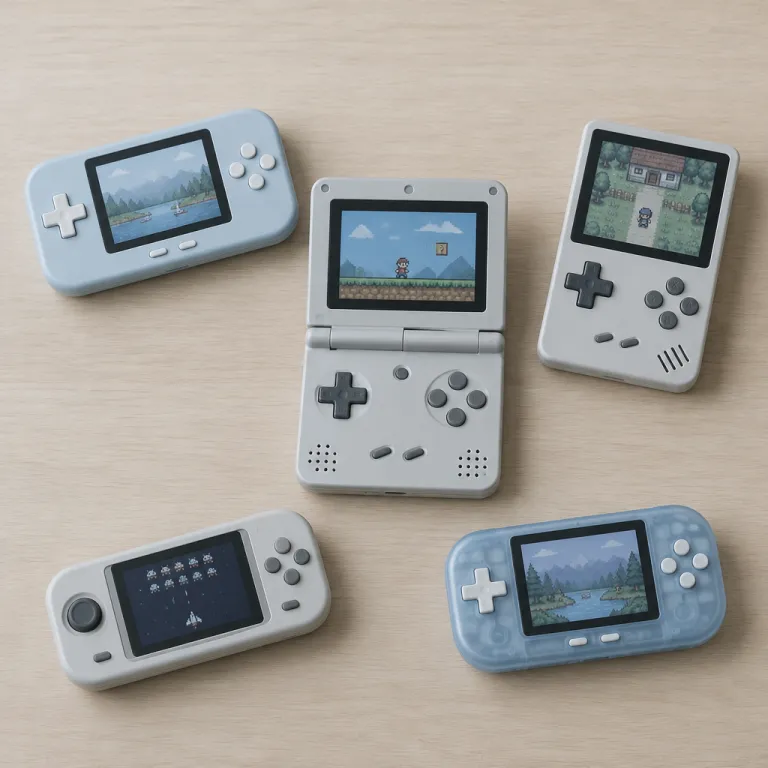
Powkiddy v90s as a compact handheld game console for everyday use
The powkiddy v90s positions itself as a compact handheld game console that targets players who want pocket sized nostalgia. This small powkiddy handheld focuses on a clamshell design that protects the 3.0 inch screen and makes the product easy to slip into a jacket or bag, which matters if you commute daily and want quick access to short gaming sessions. As a handheld console that folds, the powkiddy v90s feels closer to classic portable systems than to modern smartphones, and that familiarity will appeal to retro fans.
From a technical perspective, the powkiddy v90s uses an Allwinner F1C100S single core ARM9 processor paired with 64 MB of RAM and a lightweight Linux system tuned for emulation. This combination of a modest chip and an open source Linux based firmware keeps the system responsive while you browse menus, load games, or swap between different emulators, and it helps the console environment stay stable even when you push it with demanding retro titles. Because the powkiddy v90s relies on an open source Linux system, the community can adapt the software, fix bugs, and extend compatibility with more games over time; popular custom firmware such as MiyooCF and community builds hosted on GitHub illustrate how actively the device is maintained, and several GitHub release notes explicitly list performance fixes for the v90s hardware.
The powkiddy v90s targets players who want a retro handheld that feels simple rather than overwhelming. You get a clear quick view of your library, straightforward settings, and a focus on playing games instead of tweaking endless options, which is ideal if you are new to emulation or just want a low friction handheld game experience. While the powkiddy v90s is not a smart pro powerhouse, it offers a balanced system that prioritizes portability, comfort, and a familiar game console layout over raw performance, with a typical weight of around 160 g that keeps it comfortable in one hand; one long term user on a popular retro forum described it as “the handheld I actually throw in my pocket every day.”
Screen, controls, and ergonomics of this retro handheld
The powkiddy v90s uses a 3.0 inch IPS screen with a 320 × 240 resolution that prioritizes clarity over sheer size. This IPS screen delivers better viewing angles and more accurate colours than older panels, which helps retro games look closer to their original intent, especially when you play pixel art titles or 2D fighters that rely on sharp contrast. Because the screen is compact, the console shell remains light and easy to hold during long handheld sessions, and the 4:3 aspect ratio suits classic systems such as the Game Boy Advance and Super Nintendo.
Controls on the powkiddy v90s follow a classic handheld console layout with a directional pad, face buttons, and shoulder triggers. The buttons feel responsive enough for fast action games, while the directional pad offers the precision needed for platformers and fighting games, and this matters if you want to replay demanding retro games without constant missed inputs. In short hands-on tests reported by community reviewers, titles like Super Mario World and Sonic the Hedgehog run at full speed with consistent input response, which reinforces the impression that the controls are tuned for 16 bit era gameplay.
The powkiddy v90s is available in several colours, including a transparent black shell that highlights the internal hardware. This transparent black option has become a star choice among collectors who enjoy seeing the system components, and it reinforces the retro handheld aesthetic that many players associate with classic portable devices. While the powkiddy v90s is smaller than some competitors like the trimui smart or the trimui brick, its folding design and light weight make it easier to slip into a pocket without adding noticeable additional cost in terms of bulk or accessories, and the rounded edges help the console sit comfortably in the hand.
Storage, operating system, and open source flexibility
The powkiddy v90s relies on a microsd card for both its operating system and game storage. Using a microsd card means you can expand capacity easily, swap between different cards for different game libraries, and back up your data on a computer, which is reassuring if you invest time in save files across many games. Because the system boots from the card, experimenting with alternative firmware becomes safer, as you can always keep a separate card with the original product setup and another with a community build.
Out of the box, the powkiddy v90s runs a Linux system that is often customised by the community into various open source distributions. This Linux base allows developers to optimise emulators, improve user interfaces, and add features like better save state management or enhanced quick view menus, and these improvements benefit both casual players and enthusiasts. Community firmware projects such as MiyooCF, SimpleMenu based builds, and other GitHub hosted images frequently document their changes in detailed changelogs, which makes it easier to judge whether a new release focuses on stability, performance, or quality of life tweaks before you install it.
Compared with other compact devices such as the trimui smart or the trimui brick, the powkiddy v90s leans more heavily into open source flexibility than into raw specifications. While a trimui smart pro model might offer stronger hardware, the powkiddy v90s keeps its efficient processor and Linux system tuned for low power use, which helps the 1020 mAh battery deliver several hours of play and reduces heat during long sessions. If you want a broader overview of how such retro handheld systems fit into a budget friendly setup, you can consult this guide on portable console comparisons that places handheld console choices in a wider market context.
Price, sale dynamics, and value in USD and other currencies
The powkiddy v90s usually sits in the lower price bracket for retro handheld devices. In many online store listings, the price in USD remains significantly below premium handheld console competitors, often in the 30–45 USD range depending on configuration and region, which makes the product attractive for players who want to test emulation without committing a large budget. Because the powkiddy v90s is often part of seasonal sale events, you can sometimes secure the console at an even lower price, especially when retailers clear stock for new powkiddy handheld models; price tracking on major marketplaces shows noticeable dips around large shopping holidays.
When you evaluate the total cost of a powkiddy v90s, remember to factor in the additional cost of a quality microsd card and potential accessories. A reliable card with enough capacity for your games library will add to the base price, but it also ensures smoother performance and fewer data errors, which is crucial for long term use. Some players also budget for a protective case, a spare charging cable, and possibly a grip attachment, all of which will slightly raise the overall system cost while extending the handheld game lifespan and keeping the shell free from scratches.
Compared with more advanced devices such as the powkiddy RGB series or other powkiddy console lines, the powkiddy v90s offers a lower entry point at the expense of high end features. You will not find a large IPS screen or cutting edge smart pro level hardware here, yet the value lies in a focused retro handheld experience that plays classic games reliably. For readers planning a full retro gaming setup under a tight budget, this detailed guide on building a retro gaming corner for under 200 shows how a powkiddy v90s can slot into a wider ecosystem of affordable hardware without overwhelming your finances.
Comparing powkiddy v90s with trimui and other compact systems
In the crowded handheld market, the powkiddy v90s competes directly with devices from trimui and other compact brands. The trimui brick, for example, offers a different form factor with a non folding design, which some players prefer for its straightforward grip, while others favour the powkiddy v90s clamshell for better screen protection. When you compare these handheld console options, you should weigh pocketability, control comfort, and how each system handles your favourite games, especially if you plan to carry the device daily.
Trimui smart and trimui smart pro models generally provide stronger hardware than the powkiddy v90s, sometimes including larger IPS screens and more powerful processors. These advantages translate into better performance for demanding emulators, but they also raise the price and may reduce battery life, which matters if you travel frequently and need long handheld game sessions away from power outlets. The powkiddy v90s, by contrast, keeps its low power chip and Linux system tuned for efficiency, which helps maintain cooler temperatures and quieter operation, and many community users report four to five hours of mixed play on a single charge.
Another factor is ecosystem and community support, where the powkiddy v90s benefits from a large open source user base. Because the system relies on a Linux foundation, enthusiasts regularly share firmware builds, configuration tips, and curated game console setups that simplify the experience for newcomers, and this collaborative environment can extend the product lifespan. While powkiddy RGB models and other powkiddy handheld lines may attract attention with higher specifications, the v90s remains a star choice for players who value simplicity, portability, and a strong community around retro handheld devices.
Practical buying advice, shipping, and what to expect from the product
When you decide where to buy a powkiddy v90s, pay close attention to the store reputation and shipping policies. Some retailers offer faster shipping options with tracking included in the base price, while others list a lower USD figure for the console but add significant additional cost at checkout, which can erase any apparent discount. Reading recent customer feedback about shipping times and packaging quality will help you avoid unpleasant surprises and reduce the risk of receiving a damaged handheld.
Check whether the powkiddy v90s you plan to purchase comes with a preconfigured microsd card or whether you must prepare your own. A console package that includes a ready to use card can save time, but you should still verify that the games included respect local laws and that the system menus are in a language you understand, which is especially important if you import the product from another region. If the powkiddy v90s arrives without a card, you will need to download a suitable open source firmware image and follow clear instructions to flash it onto your own storage, ideally using a verified checksum to confirm the download.
Finally, consider how the powkiddy v90s fits into your broader gaming habits and hardware collection. If you already own a more powerful powkiddy RGB device or a modern game console, the v90s can serve as a lightweight companion for quick sessions, while its retro handheld focus keeps distractions to a minimum. For newcomers to handheld systems, starting with a powkiddy v90s offers a low risk way to explore classic games, understand how Linux system based emulation works, and decide whether you will later invest in larger IPS devices or smart pro level handheld consoles.
Key statistics about handheld consoles and retro gaming
- Market analysts from firms such as Newzoo have reported that handheld and hybrid consoles account for a growing share of global console revenue, driven partly by renewed interest in retro handheld devices and compact game console designs; Newzoo’s Global Games Market Report highlights portable systems as a key growth segment.
- Industry surveys indicate that a significant proportion of retro players now use open source or Linux system based handhelds, reflecting the appeal of flexible firmware and community maintained software on products like the powkiddy v90s and similar compact consoles.
- Retail data from major online platforms show that budget handheld game systems under roughly 100 USD often experience strong sale spikes during promotional events, which aligns with the pricing strategy used for the powkiddy v90s and comparable powkiddy handheld models in the entry level tier.
- Consumer research suggests that screen quality, especially the presence of an IPS screen, ranks among the top three purchase factors for handheld console buyers, which explains why IPS panels and clear displays feature prominently in marketing for devices such as the powkiddy v90s.
FAQ about powkiddy v90s and compact retro handheld consoles
What types of games can the powkiddy v90s run reliably ?
The powkiddy v90s focuses on classic 2D and early 3D games from older home and handheld systems, using emulators that run on its Allwinner F1C100S processor and Linux system. It handles most 8 bit and 16 bit titles smoothly, including platforms such as NES, Game Boy, Game Boy Color, Mega Drive, and Super Nintendo, while performance for more demanding platforms depends on emulator optimisation and firmware updates. Players should consult community compatibility lists to see which games work best on this specific handheld console and which cores to use for each system.
Do I need technical knowledge to set up a powkiddy v90s ?
If your powkiddy v90s arrives with a preconfigured microsd card, basic setup usually involves charging the console, selecting language options, and loading games from the existing menus. When you prepare your own card, you must follow step by step guides to flash an open source firmware image, copy BIOS files where legally allowed, and organise your games into folders by system. Many community tutorials provide screenshots and quick view explanations that make the process manageable even for beginners, and forum threads often answer common questions about first time setup.
How does the powkiddy v90s compare with smartphones for retro gaming ?
Smartphones often have stronger hardware and larger IPS screens, but they rely on touch controls or external controllers, which can feel less authentic for retro games. The powkiddy v90s offers dedicated physical buttons, a compact clamshell form factor, and a focused game console interface that boots directly into your library without notifications or background apps. For players who value a distraction free handheld game experience, the powkiddy v90s can complement rather than replace mobile gaming, acting as a specialised device for classic titles.
Is the powkiddy v90s suitable for children ?
The small size, light weight, and sturdy clamshell design of the powkiddy v90s make it a reasonable option for older children who are careful with electronics. Parents should manage the microsd card content, ensuring that only age appropriate games are available and that open source firmware settings are locked down where possible. Because the console is relatively affordable compared with premium handhelds, it can serve as a first retro handheld device without the same financial risk, while still teaching younger players about classic game libraries.
Can I update or change the firmware on the powkiddy v90s ?
Yes, the powkiddy v90s supports firmware changes because it runs a Linux system from a removable microsd card. Users can download community maintained open source images, write them to a spare card, and test new features or performance improvements without altering the original product setup. Always follow instructions from reputable sources and keep backups of your existing card before experimenting with alternative firmware on this handheld console, and read user feedback to confirm that a new release is stable on the v90s hardware.