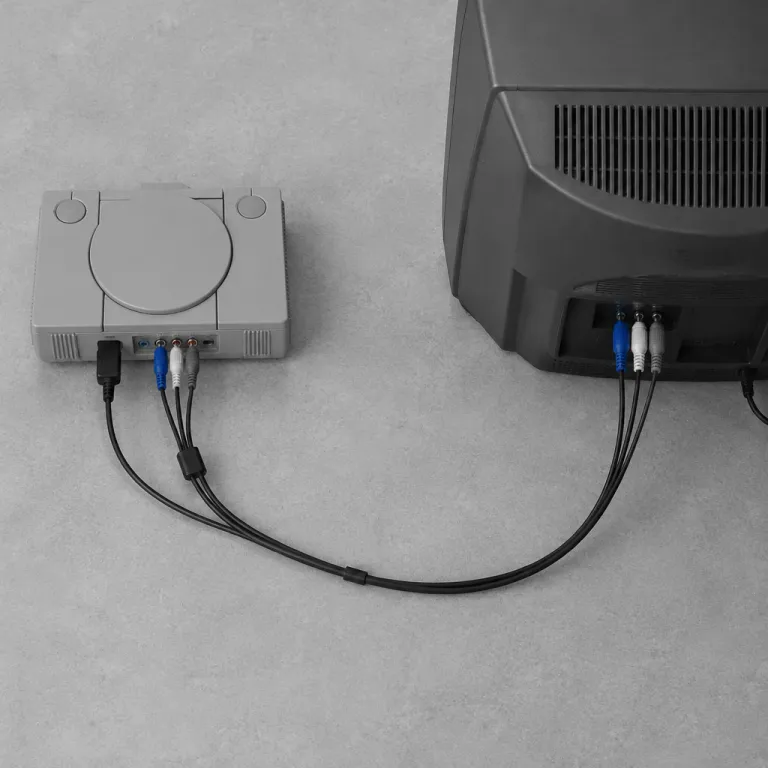
What is a component cable and how does it work
Breaking Down Component Cables: What Are They?
Component cables are a type of analog video cable used to transmit high-quality video signals from gaming consoles to TVs or monitors. Unlike standard composite cables, which combine all video information into a single yellow RCA connector, component cables split the video signal into three separate channels: red, green, and blue. This separation allows for a clearer, more vibrant image, especially important for gamers seeking the best possible picture quality on older consoles or HDTVs.
How Component Cables Work in Gaming Setups
Each component cable typically features three RCA connectors for video—colored red, green, and blue (often labeled Y, Pb, and Pr)—and two additional connectors for stereo audio (red and white). The video component cables carry the analog signal, with each channel responsible for a portion of the image data. This division reduces signal interference and color bleeding, resulting in sharper visuals compared to composite video cables.
- Green (Y): Carries the brightness (luminance) and sync information.
- Blue (Pb): Transmits the blue color difference signal.
- Red (Pr): Handles the red color difference signal.
Audio is transmitted separately, ensuring that both sound and picture maintain high fidelity. Some high-end component cables feature gold plated connectors for improved signal quality and corrosion resistance, which can be a factor in price and user ratings (stars).
Why Gamers Still Use Component Cables
While digital HDMI has become the standard for modern consoles, many classic systems rely on analog connections like component video. Gamers who want to experience retro titles in their original format often prefer component cables for their ability to deliver high definition signals without the digital conversion. For those interested in optimizing their setup, accessories like a PS5 charging dock can further enhance the gaming experience, especially when paired with the right video cable.
Understanding the differences between cable types, such as composite, component, and HDMI, is crucial for choosing the best connection for your console and display. The next sections will explore why component cables matter for gaming consoles and how to select the right one for your needs.
Why component cables matter for gaming consoles
Why Gamers Care About Component Cables
Component cables play a crucial role in delivering high definition video and audio signals from your gaming console to your TV. Unlike older composite cables, which combine all video signals into one yellow RCA connector, component cables split the video signal into three separate channels: red, green, and blue. This separation allows for better color accuracy and sharper images, making a noticeable difference in picture quality, especially on larger screens or HDTVs.
- Video quality: Component video cables support resolutions up to 1080p, which is a significant upgrade over the standard definition provided by composite video cables. This means your games look clearer, with more vibrant colors and less blurring.
- Analog signal advantage: While HDMI cables transmit digital signals, component cables use analog. For some retro consoles, analog output is the native standard, so using a component cable preserves the original signal quality without digital conversion.
- Audio video separation: Component cables often come with separate RCA connectors for audio, ensuring that both sound and video signals are transmitted cleanly. This is especially important for gamers who want immersive audio without interference.
- Connector quality: Gold plated cable connectors can reduce signal loss and corrosion, which is something to consider if you want the best performance from your setup.
Gamers who use component cables often do so to get the most out of their older consoles, where HDMI isn’t an option. The right component video cable can make a big difference in how your games look and sound, especially if you’re using a high definition display. When comparing price and performance, component cables are usually more affordable than some specialty digital solutions, and they’re widely available in various lengths and qualities, including options like cmple RCA and RGB component cables.
If you’re looking to enhance your gaming experience further, consider checking out this guide on how a PS5 charging dock can streamline your setup.
Comparing component cables to HDMI and composite cables
How component cables stack up against HDMI and composite options
When connecting your gaming console to a TV, the choice of video cable can have a big impact on your experience. Three main types are commonly used: component cables, HDMI, and composite cables. Each has its own strengths and weaknesses, especially when it comes to video signal quality, price, and compatibility with different gaming systems.
- Component cables use three separate RCA connectors for video—typically colored red, green, and blue—along with two more for audio. This setup allows for the transmission of analog high definition signals, often up to 1080i. The separation of the video signal into RGB component channels reduces interference and delivers a sharper image than older standards. Gold plated cable connectors can further improve signal quality and durability.
- Composite cables combine all video information into a single yellow RCA cable, with red and white for audio. This analog standard is widely compatible but limited to standard definition. The video signal can appear blurry or washed out, especially on modern HDTVs. Composite video cables are best suited for older consoles or retro gaming setups.
- HDMI cables transmit both digital video and audio in one cable. They support higher resolutions, including full HD and 4K, with no signal degradation. HDMI is the current standard for most new gaming consoles, offering easy setup and the best possible picture quality. However, older consoles may not support HDMI without adapters.
When comparing these options, component video cables offer a strong balance between quality and compatibility for consoles released in the early 2000s. They outperform composite cables in clarity and color accuracy, thanks to their ability to handle separate RGB signals and sync. However, HDMI has become the go-to for newer systems due to its digital transmission and support for higher resolutions.
Price can also be a factor. While HDMI cables are widely available and affordable, high-quality component cables—especially those with gold plated connectors—can be more expensive. Composite cables are usually the cheapest, but their limited performance may not justify the savings for most gamers.
For a deeper dive into how controller technology is also evolving alongside video cables, check out this insightful article on next-gen controllers.
| Cable Type | Video Signal | Audio | Max Resolution | Connector Type | Typical Use |
|---|---|---|---|---|---|
| Component | Analog (RGB component) | Analog (RCA) | 1080i | Red, Green, Blue RCA + Red/White RCA | PS2, Xbox, Wii, early HDTVs |
| Composite | Analog (composite video) | Analog (RCA) | 480i | Yellow RCA + Red/White RCA | Older consoles, retro gaming |
| HDMI | Digital | Digital | 4K+ | HDMI | Modern consoles, HDTVs, monitors |
Ultimately, the best video cable for your setup depends on your console, display, and the level of video and audio quality you want. Understanding the differences between component, composite, and HDMI cables helps you make an informed decision for your gaming experience.
Choosing the right component cable for your console
Factors to Consider When Selecting a Component Cable
Choosing the right component cable for your gaming console can make a noticeable difference in video and audio quality. Not all cables are created equal, and several factors can affect your gaming experience. Here are some key points to keep in mind:
- Compatibility: Make sure the cable matches your console’s output and your TV’s input. Some consoles use proprietary connectors, while others rely on standard RCA connectors for component video and audio signals.
- Signal Quality: Look for cables that support high definition (HD) video signals. A good component video cable should clearly transmit the red, green, and blue (RGB) video component signals, minimizing interference and signal loss.
- Build Quality: Gold plated connectors can help reduce corrosion and improve signal transfer. Well-shielded cables also help prevent analog signal interference, which is especially important for longer cable runs.
- Audio Support: Component cables typically carry video signals, so check if the cable includes separate audio connectors (usually red and white RCA connectors) for stereo sound. Some bundles include both video and audio cables, while others may require a separate audio video cable.
- Price and Reviews: Price can vary widely. While you don’t always need the most expensive option, extremely cheap cables may compromise on build quality. Checking user ratings and stars can help you find a reliable product that fits your budget.
- Length: Measure the distance between your console and TV to avoid signal degradation. Longer cables may require better shielding to maintain signal integrity.
Types of Component Cables and Connectors
Component cables come in different configurations. The standard setup uses three RCA connectors for video (red, green, blue) and two for audio (red, white). Some cables are labeled as RGB component or video component cables, while others are marketed as cable HDTV or cable RCA. For best results, ensure the connectors are color-coded and clearly labeled.
| Type | Connectors | Signal | Use Case |
|---|---|---|---|
| Standard Component | Red, Green, Blue (Video) + Red, White (Audio) | Analog Video & Audio | Most gaming consoles and HDTVs |
| RGB Component | RGB connectors (sometimes BNC or SCART) | Analog Video | Retro gaming, professional setups |
| Composite Cable | Yellow (Video), Red & White (Audio) | Analog Video & Audio | Older consoles, standard definition |
Tips for Getting the Best Performance
- Use high-quality cable connectors to maintain sync and minimize signal loss.
- Keep cables away from power cords and other sources of interference.
- If you notice black or distorted images, check the cable for damage or loose connections.
- Brands like Cmple RCA and other reputable manufacturers often provide better durability and reliability.
By considering these factors, you can ensure your gaming console delivers crisp video and clear audio, whether you’re using a classic analog setup or connecting to a modern HDTV with component video cables.
Common issues and troubleshooting with component cables
Identifying and Fixing Common Problems with Component Cables
Component cables, often recognized by their red, green, and blue connectors, are a standard for transmitting analog video signals in high definition. However, even with quality cables, users can encounter issues that affect video and audio performance. Here’s a practical guide to troubleshooting the most frequent problems:- No Video Signal or Black Screen
- Double-check that each cable connector is firmly plugged into the correct color-coded port (red, green, blue for video, red and white for audio).
- Ensure the source device and display are both set to use component video input, not composite or HDMI.
- Inspect the cable for visible damage, especially near the male connectors.
- Double-check that each cable connector is firmly plugged into the correct color-coded port (red, green, blue for video, red and white for audio).
- Distorted or Discolored Video
- Mismatched connections (for example, swapping green and blue) can cause color issues. Always match the cable color to the port.
- Poor-quality or worn-out cables may not carry the full analog signal, leading to faded or incorrect colors. Consider upgrading to gold plated or higher-quality video cables for better signal integrity.
- Mismatched connections (for example, swapping green and blue) can cause color issues. Always match the cable color to the port.
- No Audio Output
- Remember, component video cables only carry video signals. Audio requires separate RCA cables (usually red and white).
- Check that the audio connectors are plugged into the correct audio input/output ports.
- Remember, component video cables only carry video signals. Audio requires separate RCA cables (usually red and white).
- Image Flickering or Sync Issues
- Loose cable connectors can cause intermittent signal loss or sync problems. Secure all connections and avoid using excessively long cables, which can degrade the signal.
- If your display supports multiple video standards, verify that both the console and TV are set to the same standard (such as NTSC or PAL).
- Loose cable connectors can cause intermittent signal loss or sync problems. Secure all connections and avoid using excessively long cables, which can degrade the signal.
- Compatibility Problems
- Some newer TVs may not support analog component video inputs. In these cases, a component to HDMI converter may be necessary, but check for signal compatibility and possible input lag.
Tips for Maintaining Your Component Video Setup
- Store cables properly to avoid kinks or breaks in the internal wiring.
- Clean cable connectors periodically to prevent dust buildup, which can interfere with signal transmission.
- When possible, use cables with solid shielding and gold plated connectors for better durability and signal quality.
- Compare price and user ratings (such as stars) when selecting replacement cables to ensure you get reliable performance without overspending.
Future-proofing your gaming setup: are component cables still relevant
Are analog cables still a smart choice for modern gaming?
With the rise of digital connections like HDMI, many gamers wonder if component cables and their RCA connectors still have a place in today’s gaming setups. Component video cables, known for splitting the video signal into red, green, and blue (RGB) channels, once set the standard for high definition on older consoles. But as technology moves forward, the relevance of these analog cables is shifting.
- Compatibility: Most new consoles have phased out component video outputs in favor of digital connectors. If you’re using classic systems or retro hardware, component cables remain essential for getting the best possible video and audio quality from those devices.
- Signal Quality: Analog signals, like those carried by component and composite cables, can’t match the clarity and stability of digital signals. HDMI and other digital standards offer better sync, less interference, and support for higher resolutions.
- Price and Availability: As demand drops, some high-quality component cables—especially gold plated or RGB component variants—are becoming harder to find and sometimes more expensive. However, brands like Cmple RCA still offer reliable options for those who need them.
- Adapters and Converters: If your display only has HDMI or digital inputs, you may need a converter to use component video cables. These adapters can introduce lag or signal degradation, so check reviews and ratings (stars) before purchasing.
When to keep your component cables
If you’re passionate about retro gaming or want to preserve the authentic look and feel of classic titles, keeping a set of quality component cables makes sense. They deliver better video than composite video cables and can support high definition signals up to 1080i. For modern consoles and displays, though, digital is the new standard. As you plan your gaming setup, weigh the benefits of analog connectors against the convenience and performance of digital solutions.
Ultimately, component cables still matter for specific use cases—especially for enthusiasts who value original hardware and video fidelity. But for most gamers, transitioning to digital video cables is the best way to future-proof your entertainment system.