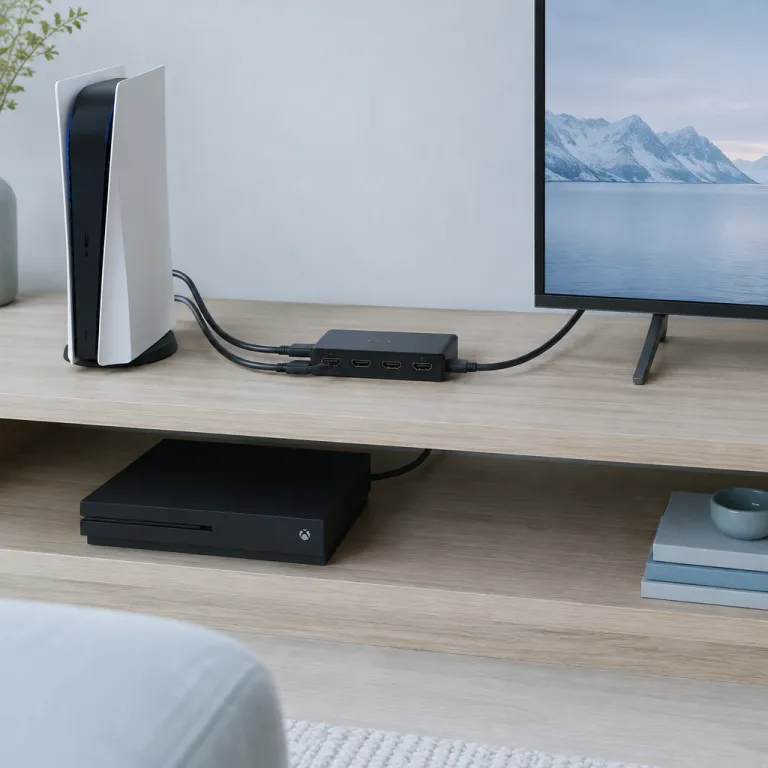
Understanding what an HDMI matrix is and how it works
What Makes an HDMI Matrix Unique for Gamers?
An HDMI matrix is a device that allows you to connect multiple HDMI sources, like gaming consoles, to several displays or TVs. Unlike a basic HDMI switcher, which only lets you select one input at a time, a matrix switcher can route any input HDMI signal to any output display independently. This flexibility is a game changer for anyone with more than one console or display in their setup.
Matrix switchers are available in various configurations, such as 4x2, 8x8, or even larger pro series models. These numbers refer to the number of HDMI inputs and outputs. For example, a 4x2 matrix HDMI device can connect four sources to two displays, letting you control which game or video appears on each screen. Many modern matrix switches also support audio routing, EDID management, and even SDI or DVI connections for more advanced setups.
How Does an HDMI Matrix Work in a Gaming Setup?
When you connect your gaming consoles, streaming boxes, or PCs to a matrix switch, each device becomes an input HDMI source. The matrix then distributes these signals to your chosen displays. Some models include USB ports, IR remote control, or even a touch screen or control app for easy switching. Pro series HDMI matrix switchers may also offer rack mount options for a clean, professional look.
With the right cables and adapters, you can integrate additional products like HDMI extenders, video wall processors, or even Orei HDMI matrix extenders for longer cable runs. This makes it possible to build a system that fits your space, whether you're gaming in a living room, dedicated game room, or even a small esports venue.
- Matrix switchers can handle high-resolution video and audio, supporting 4K or even 8K signals depending on the model.
- Some matrix HDMI products offer free delivery, making them more accessible for home gamers and pros alike.
- Advanced models include features like EDID control, USB switching, and integration with smart home systems.
If you're interested in the technical side of how HDMI and other video cables work with gaming consoles, check out this guide to DisplayPort cables in gaming consoles for a deeper dive into connectivity options.
Benefits of using an HDMI matrix with gaming consoles
Why Gamers Are Turning to HDMI Matrix Switchers
For anyone serious about gaming, managing multiple devices and displays can quickly become a headache. An HDMI matrix is a game-changer, letting you connect several consoles and screens, then control which source goes to which display—all with a single matrix switcher. This means less cable swapping and more time playing.
- Seamless switching: With a matrix hdmi system, you can switch between your PlayStation, Xbox, or PC with a remote control or even a touch screen panel. No more unplugging hdmi cables or fiddling with adapters.
- Multi-room flexibility: Want to play in the living room, then move to your bedroom? Matrix switchers let you route your hdmi input to different rooms or monitors, making your setup more versatile.
- Audio and video control: Many pro series matrix switches support advanced audio routing, so you can send game sound to your soundbar or headphones, and video to your TV or projector. Features like EDID management ensure compatibility with various displays.
- Professional features: Some matrix switchers offer USB support, SDI or DVI inputs, and even video wall capabilities. These are ideal for streamers or those using pro series products.
- Easy expansion: If you add more consoles or upgrade to a new series hdmi device, a matrix system can handle it. Just connect the new device to an available hdmi input or use hdmi extenders for longer cable runs.
Enhancing Your Gaming Setup
Using a matrix hdmi solution means your gaming area stays tidy, with fewer cables adapters cluttering your space. Many matrix switchers are rack mountable, making them easy to integrate into a home entertainment system. Some brands, like Orei HDMI, offer free delivery and a range of matrix switch products at different price points.
For those who want to dive deeper into optimizing their gaming experience, understanding how mouse DPI affects gaming can also be a valuable read.
Choosing the right HDMI matrix for your gaming needs
Key Factors to Consider When Selecting an HDMI Matrix
When choosing an HDMI matrix for your gaming setup, it’s important to match the device’s features with your specific needs. The right matrix switcher can make a big difference in how you manage your gaming consoles, displays, and audio systems. Here are some essential points to help you make an informed decision:
- Number of Inputs and Outputs: Think about how many gaming consoles and displays you want to connect. A matrix switch with enough HDMI input and output ports ensures flexibility as your system grows.
- Supported Resolutions and Formats: Look for products that support 4K video, HDR, and high-quality audio. Pro series HDMI matrix switchers often offer advanced video wall capabilities and support for multiple formats like SDI, DVI, and USB.
- Control Options: Consider how you want to manage your matrix. Many matrix switches come with remote control, touch screen panels, or even a control app for smartphones. Some models allow integration with home automation systems for seamless operation.
- EDID Management: Proper EDID (Extended Display Identification Data) handling ensures your gaming consoles and displays communicate correctly, preventing video or audio issues. Pro series matrix switchers often have advanced EDID settings for optimal compatibility.
- Audio Extraction and Routing: If you use external speakers or a sound system, look for a matrix HDMI switcher with audio extraction features. This allows you to route audio independently from video, which is especially useful for immersive gaming experiences.
- Build Quality and Mounting: For a permanent setup, rack mount options and sturdy construction are important. Orei HDMI matrix switchers and other pro series products often offer robust build quality suitable for dedicated gaming rooms.
- Connectivity and Accessories: Check if the matrix supports HDMI extenders, cables adapters, and other accessories. This is crucial for larger setups or when displays are far from your consoles.
- Price and Warranty: Compare prices and warranty terms. Free delivery and good after-sales support can add value to your purchase.
Don’t forget to invest in high-quality cables. The performance of your matrix system depends heavily on the reliability of your HDMI cables and extenders. For guidance on selecting the right cables and testing tools, check out this guide to HDMI cable testers for gaming console setups.
By considering these factors, you can choose a matrix switcher that fits your gaming needs and ensures a smooth, flexible experience for years to come.
Setting up your HDMI matrix for optimal performance
Getting Your HDMI Matrix Ready for Gaming
Setting up an HDMI matrix for your gaming console system can seem intimidating, but with the right approach, you’ll get the most out of your investment. Whether you’re using a pro series matrix switcher or a more basic matrix hdmi switch, following a few key steps will help you achieve smooth video and audio performance across all your devices.
- Choose Quality Cables and Adapters: Use high-quality HDMI cables and, if needed, cables adapters to connect your consoles, TV, and audio system. This reduces signal loss and ensures the best video and audio output. For longer distances, consider hdmi extenders or sdi solutions.
- Connect All Devices Properly: Plug your gaming consoles into the input hdmi ports on the matrix switcher. Connect your display (TV, monitor, or video wall) to the hdmi output ports. If your matrix supports USB or DVI, use the appropriate cables for those connections.
- Configure EDID Settings: Many matrix switchers, especially in the pro series, offer EDID management. Setting the correct EDID ensures your gaming console recognizes the display’s capabilities, like 4K or HDR, preventing compatibility issues.
- Mount and Organize: If you have a rack mount or wall mount system, securely install your matrix and manage cables to avoid tangling. This not only looks pro but also helps with airflow and maintenance.
- Set Up Control Options: Use the remote control, control app, or touch screen (if available) to switch between consoles and displays. Some matrix switches offer advanced control via network or USB, making it easier to manage your setup.
Optimizing for Performance and Reliability
To get the best from your matrix hdmi products, consider these extra tips:
- Test Each Input and Output: After connecting everything, test each hdmi input and output to ensure video and audio are working as expected. This helps identify any faulty cables or ports early.
- Update Firmware: Check if your matrix switchers or extenders have firmware updates. Manufacturers often release updates to fix bugs or improve compatibility with new gaming consoles.
- Monitor Heat and Power: High-performance matrix switches and extenders can generate heat. Ensure your system is well-ventilated and use a reliable power source to avoid interruptions during gaming sessions.
- Label Cables and Ports: For larger setups, label each cable and port. This makes troubleshooting and future upgrades much easier, especially if you add more consoles or displays.
With careful setup and a bit of planning, your HDMI matrix can become the heart of a flexible, powerful gaming environment. Whether you’re using an orei hdmi matrix, a pro series hdmi matrix switch, or other matrix switches, these steps will help you enjoy seamless switching, reliable audio, and crisp video every time you play. Many products offer free delivery, so you can upgrade your setup without extra shipping costs.
Troubleshooting common HDMI matrix issues with gaming consoles
Common Problems and Quick Fixes
Even with the best matrix switchers or pro series hdmi matrix, issues can pop up when connecting gaming consoles. Here’s a quick guide to help you resolve the most frequent problems:
- No Signal or Flickering Video: Double-check your hdmi cables and ensure each hdmi input and output is securely connected. Sometimes, using high-quality cables or hdmi extenders can make a difference, especially for longer runs or wall mounts.
- Audio Not Passing Through: Some matrix switchers require you to set the correct audio output format. Make sure your gaming console’s audio settings match the matrix hdmi system’s supported formats. If you use a pro series matrix with advanced audio control, check the manual for specific settings.
- Resolution or EDID Issues: If your video looks off or doesn’t display at the right resolution, your matrix switch may need to be set to the correct EDID mode. Many matrix products let you select EDID profiles for each hdmi input, ensuring compatibility with your display or video wall.
- Remote Control or Touch Screen Not Responding: If your matrix switcher comes with a remote control, touch screen, or control app, make sure batteries are fresh and the device is within range. For app-based control, confirm your system is on the same network as the matrix switch.
- USB or DVI Devices Not Detected: Some matrix switches support usb or dvi connections. Use the correct cables adapters and check that the matrix supports the input type you’re using.
Tips for Reliable Performance
- Use certified hdmi cables and extenders, especially for 4K or high refresh rate gaming.
- Label your cables and hdmi input ports to avoid confusion when switching sources.
- Keep your matrix switchers and cables away from sources of electrical interference.
- If you’re using a rack mount or wall mount, ensure proper ventilation for your matrix products.
- Take advantage of free delivery options from reputable retailers to get genuine matrix hdmi products and accessories.
When to Seek Professional Help
If you’ve tried these steps and your matrix system still isn’t working as expected, it may be time to consult a pro. Some advanced matrix switches, like orei hdmi or pro series models, offer dedicated support or firmware updates. Check the manufacturer’s website for troubleshooting guides or contact their support team for assistance. Investing in reliable matrix switchers and proper setup can save you time and frustration, ensuring your gaming experience stays smooth and immersive.
Future-proofing your gaming setup with an HDMI matrix
Keeping Your Gaming Setup Ready for Tomorrow
As gaming technology evolves, so do the demands on your entertainment system. Investing in a quality HDMI matrix switcher is one of the smartest ways to ensure your setup remains flexible and compatible with new consoles, displays, and audio systems. Here’s how you can make your system future-ready:
- Choose Scalable Matrix Switchers: Look for matrix HDMI products that support a wide range of input HDMI and output formats, including 4K, HDR, and even SDI or DVI. Pro series HDMI matrix switchers often offer more ports and advanced features, making them suitable for expanding setups.
- Upgrade-Friendly Connectivity: Opt for matrix switchers with USB, audio extraction, and support for HDMI extenders. This allows you to add new devices or upgrade cables adapters without replacing your entire system.
- Advanced Control Options: Modern matrix switches come with remote control, touch screen panels, or even a control app. These features make it easier to manage your video wall or switch HDMI sources as your needs change.
- EDID Management: Ensure your matrix switcher supports EDID control. This feature helps maintain compatibility between new consoles and older displays, preventing handshake issues and optimizing video quality.
- Flexible Mounting and Installation: Rack mount options and compact designs allow you to integrate your matrix system seamlessly, whether you’re building a home theater or a pro gaming station.
- Consider Price and Delivery: While pro series matrix switchers may have a higher price, they often come with free delivery and extended warranties, offering better long-term value.
By focusing on these aspects, you can ensure your HDMI matrix remains the backbone of your gaming setup, ready to handle new consoles, advanced audio, and the latest video standards. Whether you’re a casual gamer or a pro, investing in the right matrix switcher and cables now means less hassle and more playtime in the future.