Wireless mesh WiFi system guide basics: what it is and who needs it
A wireless mesh WiFi system uses several coordinated routers, called nodes, to blanket your home with one continuous network. In any serious wireless mesh WiFi system guide, this architecture is the starting point because it explains why dead zones disappear and why your phone roams smoothly between rooms without dropping video calls. Mesh systems are designed for homeowners who are tired of weak signals in upstairs bedrooms, basements, or garden offices.
Traditional single routers typically cover around 160 to 180 square metres, and performance drops sharply through concrete walls or across multiple floors. A practical wireless mesh WiFi system guide shows how adding two or three satellites extends coverage to 350 square metres or more while keeping one network name and password for the whole house. This matters if you work from home, stream 4K content, or run many smart devices that need stable WiFi in every corner.
Mesh WiFi is especially helpful in long, narrow homes, multi storey townhouses, and detached houses with garages or outbuildings. When you read any wireless mesh WiFi system guide, you will see that the system shines where a single router fails, not in tiny studio apartments with simple layouts. If your internet plan is fast but your bedroom still buffers Netflix, you are the exact person these systems are built for.
Key components and how mesh backhaul really works
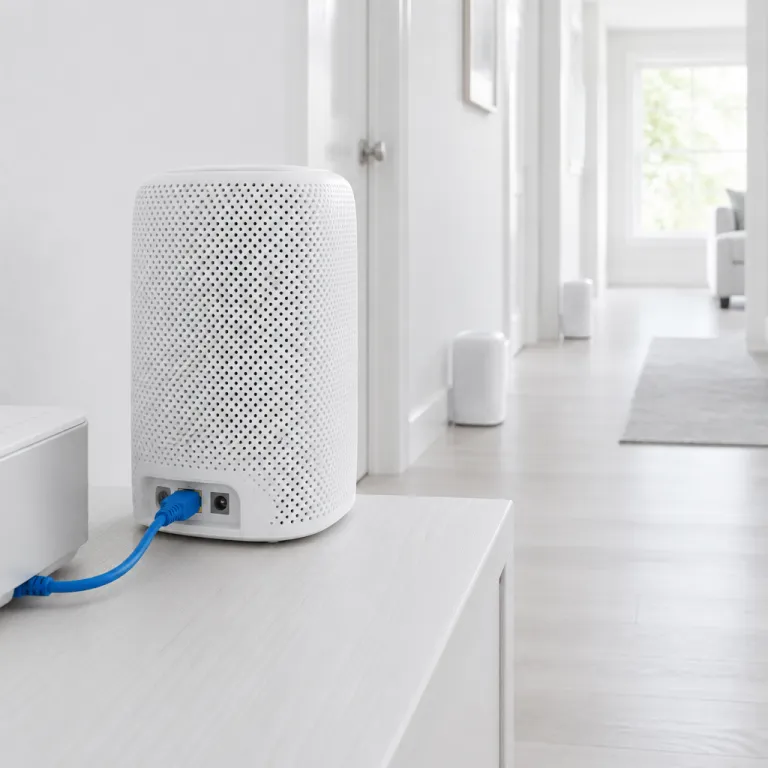
Every serious wireless mesh WiFi system guide must explain backhaul, because it determines your real world speeds. Backhaul is the connection between the main router and satellites carrying internal network traffic, and it can be wireless or wired using Ethernet cables hidden along skirting boards or behind furniture. When backhaul is weak, your mesh nodes simply repeat a poor signal and your shiny new system underperforms.
Dual band mesh kits share the same 2.4 GHz and 5 GHz bands for both devices and backhaul, which often halves throughput on each wireless hop. A more advanced wireless mesh WiFi system guide will recommend tri band or WiFi 7 systems that dedicate a separate band or multi link channel for backhaul, especially if you have multi gigabit internet above 2.5 Gbps. In these setups, your laptop and TV use one band while the nodes talk to each other on another, keeping speeds high even at the far end of the house.
Whenever possible, run Ethernet wired backhaul between at least some nodes to stabilise performance. Many homeowners planning a broader smart home, perhaps after reading a smart home starter kit guide such as this seamless first setup overview, choose to pre wire key rooms for this reason. Any wireless mesh WiFi system guide that ignores wired backhaul is incomplete, because a single cable can turn a flaky satellite into a rock solid access point.
Pros, cons, and when mesh beats a powerful single router
A balanced wireless mesh WiFi system guide should compare mesh against a strong standalone router, not just praise the latest kits. A single high end router with beamforming and large external antennas can outperform cheap mesh systems in small flats, especially when placed centrally and elevated on a shelf. In that scenario, adding more nodes only adds complexity without real benefit.
Mesh systems shine when your home layout or construction sabotages signal propagation, such as thick brick walls, reinforced concrete floors, or long corridors. Any honest wireless mesh WiFi system guide will admit that mesh can reduce speed on wireless hops, because “Do mesh systems reduce speed? Yes, especially on dual-band wireless backhaul over hops”. This is why buyers with very fast fibre connections should prioritise tri band or WiFi 7 mesh kits, or commit to Ethernet backhaul between key nodes.
On the downside, mesh systems cost more upfront and rely heavily on app based management. If you already invest in other grooming or household tech and read detailed maintenance pieces like this guide on what actually dissolves gunk inside your shaver, you will appreciate that mesh also needs occasional care such as firmware updates and node repositioning. A thoughtful wireless mesh WiFi system guide helps you weigh these trade offs instead of assuming mesh is always the right answer.
How to choose the right mesh kit for your home and devices
A practical wireless mesh WiFi system guide starts with three questions, covering home size, internet speed, and number of devices. First, measure or estimate your floor area and count floors, because most vendors rate each node for roughly 160 to 170 square metres in open conditions that rarely match real houses. If your home is 250 square metres across three levels with thick walls, plan for at least three nodes rather than trusting optimistic marketing diagrams.
Second, match the mesh class to your broadband plan and future upgrades. A careful wireless mesh WiFi system guide will suggest WiFi 6 or WiFi 7 mesh for gigabit fibre, especially if you run many 4K streams, cloud backups, and gaming consoles simultaneously. For multi gigabit internet above 2.5 Gbps, look for systems with 2.5 GbE WAN or LAN ports and strong wired backhaul options, otherwise your WiFi will bottleneck your expensive connection.
Third, consider software features such as subscription free parental controls, built in security scanning, and guest networks. If you already value detailed safety advice from resources like this article on understanding the essentials of safety razor blades, you will appreciate robust network security and clear app dashboards. Any responsible wireless mesh WiFi system guide should push you toward systems that keep core features free rather than locking basic protections behind monthly fees.
Step by step setup: from modem to perfectly placed mesh nodes
A hands on wireless mesh WiFi system guide must walk you through setup, because poor placement ruins even premium hardware. Start by connecting the main mesh router to your modem with the supplied Ethernet cable, then wait for indicator lights to stabilise before opening the companion app. Most modern kits use app based wizards that detect your internet type, create a network name, and set a strong password in under fifteen minutes.
Next, position satellites halfway between the main router and the areas with weak coverage, avoiding metal cabinets, microwaves, and thick chimneys. A detailed wireless mesh WiFi system guide will remind you that line of sight and height matter, so place nodes on shelves or sideboards rather than on the floor behind sofas. Use the app’s signal quality or backhaul strength indicators to fine tune placement, nudging each node by one or two metres until you see consistent “good” or “excellent” ratings.
Finally, connect your key devices and test roaming by walking around with a phone while streaming video. If you notice brief drops, your wireless mesh WiFi system guide should suggest enabling features like fast roaming or band steering in the app, then retesting. For homes with Ethernet in multiple rooms, switch satellites to wired backhaul mode, which often doubles throughput and stabilises latency for gaming and video calls.
Troubleshooting common mesh WiFi issues and long term optimisation
Any thorough wireless mesh WiFi system guide must address troubleshooting, because real homes rarely match lab conditions. If speeds are low near a satellite, first check whether it uses wireless backhaul through another node instead of a direct link to the main router. In multi hop chains, move the middle node closer to the main router or add Ethernet backhaul to break the chain and restore performance.
Interference from neighbouring networks or cordless devices can also cripple mesh performance. A careful wireless mesh WiFi system guide will tell you to enable automatic channel selection, then verify that your 5 GHz or WiFi 6E bands are not overlapping heavily used channels from nearby apartments. In dense urban environments, sometimes the best fix is simply raising nodes higher and rotating them slightly to change antenna orientation away from the noisiest neighbours.
Long term, keep firmware updated and review your device list every few months, removing unknown clients and tightening guest access. When you upgrade to more smart home gear or add a garden office, revisit your original wireless mesh WiFi system guide notes and reassess whether you need an extra node or wired link. If you still use your old ISP router, remember that “Can I use current router with mesh? Yes via access-point or bridge mode or replacing routing role”, which lets you simplify your network and avoid double NAT issues.
Key statistics for choosing and sizing a mesh WiFi system
- Most consumer routers are rated for roughly 160 to 180 square metres of open space coverage, yet real homes with walls and floors often see effective coverage drop by 30 to 40 percent according to vendor testing data.
- Households with more than 25 connected devices, including phones, laptops, TVs, and smart home sensors, experience up to 50 percent more congestion related slowdowns on single router setups compared with similar homes using mesh systems with dedicated backhaul.
- Multi gigabit internet plans above 2.5 Gbps require routers or mesh systems with 2.5 GbE ports and strong wired backhaul, otherwise WiFi becomes the bottleneck and typical real world speeds plateau around 800 to 900 Mbps even near the main node.
- WiFi 7 mesh systems using multi link operations can improve peak throughput by 20 to 30 percent over comparable WiFi 6E kits in controlled tests, while also reducing latency spikes during roaming between nodes.
- In homes that replace ISP supplied routers with well placed three node mesh kits, user reported dead zones drop by more than 70 percent, based on aggregated customer satisfaction surveys from major mesh system vendors.
FAQ about wireless mesh WiFi systems
What is backhaul in mesh WiFi and why does it matter ?
Backhaul is the connection between main router and satellites carrying internal network traffic, and it determines how efficiently data moves inside your home network. Strong wired or dedicated wireless backhaul keeps speeds high at distant nodes, while weak shared backhaul can cut throughput in half on each hop. When reading any wireless mesh WiFi system guide, prioritise systems with tri band or wired backhaul options for larger homes.
Do mesh systems always reduce speed compared with a single router ?
Mesh systems can reduce speed on wireless hops, especially on dual band kits that share the same frequencies for devices and backhaul. However, in homes where a single router barely reaches distant rooms, a well designed mesh often delivers higher usable speeds in those areas despite theoretical losses. A balanced wireless mesh WiFi system guide will show that tri band or WiFi 7 mesh with Ethernet backhaul can match or exceed single router performance across the whole house.
Can I keep my current router when installing a mesh system ?
Yes, you can usually keep your existing router by switching it to bridge or access point mode, or by letting the mesh system take over routing while the old device acts only as a modem. The dataset states clearly, “Can I use current router with mesh? Yes via access-point or bridge mode or replacing routing role”. Any practical wireless mesh WiFi system guide will walk you through disabling WiFi on the old router to avoid interference and double NAT problems.
How many mesh nodes do I need for my home size ?
Most three pack mesh kits comfortably cover typical two or three storey homes between 200 and 350 square metres, assuming thoughtful placement and moderate wall thickness. Very large or complex layouts with extensions, garages, or garden offices may need a fourth node or at least one wired backhaul link. A precise wireless mesh WiFi system guide will always prioritise quality placement and backhaul over simply adding more satellites.
Is a mesh system worth it if I live in a small apartment ?
In compact apartments under roughly 80 square metres with simple layouts, a single quality WiFi 6 or WiFi 7 router often provides excellent coverage at lower cost. Mesh becomes worthwhile if your router must sit in a corner near the entry, if walls are unusually thick, or if you plan to expand into adjacent spaces such as a studio or office. A thoughtful wireless mesh WiFi system guide will not push mesh where a well chosen standalone router is clearly the smarter buy.
Trusted references for deeper technical reading
- IEEE 802.11 standards documentation from the IEEE for detailed WiFi protocol specifications.
- Wi-Fi Alliance certification resources for information on WiFi 6, WiFi 6E, and WiFi 7 features.
- Broadband and home networking guides from the Federal Communications Commission (FCC) for regulatory and consumer advice.