How to choose the best streaming device for an older TV
When you search for the best streaming device for older tv, you are really asking how to give a tired screen a modern brain. The ideal streamer for a legacy television must match your TV’s ports, your home Wi‑Fi, and how comfortable you feel with different menus and remotes, because a powerful stick is useless if it confuses everyone in the living room. Before comparing models, check whether your older TV has at least one free HDMI input or only the classic yellow, red, and white RCA connectors.
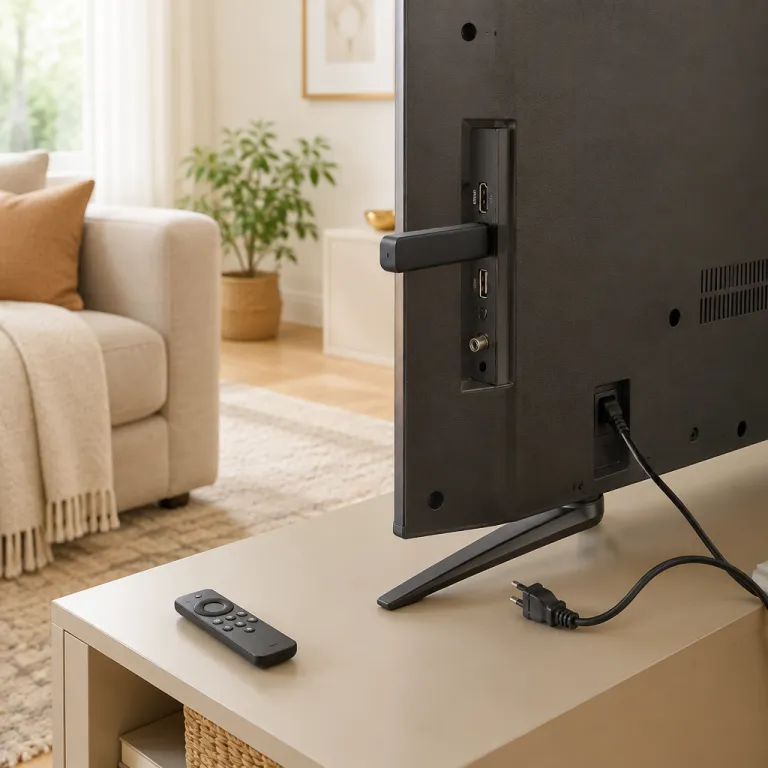
If your television has HDMI, you can use compact HDMI streaming sticks that plug directly into the port and draw power from a USB socket or wall adapter, which keeps the installation neat and avoids extra cables dangling behind the cabinet. In this case, the best streaming device for older tv owners is usually a simple stick that supports HD or 4K output, Wi‑Fi 5 or Wi‑Fi 6, and a remote with TV power and volume buttons so you do not juggle two controllers. When the TV only offers RCA inputs, you will need both a streaming stick and an HDMI‑to‑RCA adapter, because the adapter converts the digital HDMI signal into the analogue composite signal your older panel understands.
Budget streaming sticks usually cost between 30 and 70 USD, while a typical HDMI‑to‑RCA adapter adds around 10 to 20 USD to the bill, so even with accessories you often spend less than replacing the TV. That price range makes the best streaming device for older tv owners a very cost‑effective upgrade, especially when the screen itself still delivers acceptable brightness and colour for casual viewing. This approach extends the life of your existing television, reduces electronic waste, and gives you access to modern streaming apps without learning a completely new TV interface.
Top picks: Roku, Fire TV, Google TV and Apple TV on older screens
For many buyers, the best streaming device for older tv sets with HDMI is a Roku Streaming Stick HD or Roku Express 4K Plus, because Roku’s interface is clean and the remotes are straightforward. These Roku models output HD or 4K over HDMI, so they work perfectly with older 720p or 1080p televisions that automatically downscale the signal to their native resolution, and they keep navigation simple for guests or seniors. If you want a budget‑friendly best streaming device for older tv installations, Roku’s sticks usually undercut premium boxes while still offering the main streaming apps and reliable performance.
When you prefer deep integration with Amazon services, the Amazon Fire TV Stick 4K Plus becomes a strong candidate for the best streaming device for older tv owners who already use Alexa speakers or shop frequently on Amazon. This stick supports Wi‑Fi 6, which helps maintain stable streaming on congested home networks, and its voice remote lets you search for shows or control smart home devices without typing on a virtual keyboard. Some users dislike the extra promotional content on the Fire TV home screen, yet the combination of speed, app support, and voice control still makes it a top overall pick for many households.
Google fans should look at a Google TV Streamer 4K, which integrates tightly with Android phones and Google Home smart speakers, and can act as the best streaming device for older tv setups in homes already built around Google services. If you own an iPhone, iPad, or other Apple devices and want premium hardware plus strong smart home integration, Apple TV 4K stands out as a more expensive but very polished option that feels fast even on older televisions. Whichever platform you choose, pairing one of these sticks or boxes with an older HDMI television gives you a modern streaming experience without replacing the screen, and you can later move the same device to a new TV when you eventually upgrade.
For readers planning a broader living room upgrade, it is worth thinking about audio as well as video, and a detailed comparison of soundbar vs home theater systems can help you match your new streaming device with better sound. A well‑chosen soundbar can make an older TV feel far more cinematic, even if the panel itself is not cutting edge. Combining improved sound with the best streaming device for older tv setups often delivers the biggest perceived upgrade for the least money.
Non HDMI televisions: using HDMI to RCA adapters safely and effectively
Some of the oldest televisions still in use lack HDMI ports entirely, which complicates the search for the best streaming device for older tv models in guest rooms, garages, or holiday homes. In these cases, you can still use modern HDMI streaming sticks by adding an HDMI to RCA adapter that converts the digital signal into the analogue composite format your TV expects. This small accessory becomes essential when you want the best streaming device for older tv sets that only have yellow video and red and white audio inputs.
To set this up, connect the streaming stick to the HDMI input on the adapter, then run the three RCA cables from the adapter to the matching colour‑coded ports on the television, and finally select the correct AV input on the TV’s menu. Power the adapter using its USB cable and plug the streaming stick into a USB power adapter or a powered USB port, because many older TVs do not provide enough current from their own USB sockets. Once connected, the stick will output a 480i or 576i compatible signal through the adapter, allowing even very old televisions to show modern streaming menus, although picture quality will be limited by the screen’s native resolution.
This setup means the best streaming device for older tv owners with composite‑only inputs is still usually a mainstream HDMI stick, not a rare legacy box, because the adapter handles the compatibility layer. When you plan a broader smart home on a budget, pairing this approach with guidance on cheap smart home gadgets under 50 helps you modernise the whole room without overspending. Later, if you replace the old television with a new HDMI model, you can remove the adapter and keep using the same streaming stick, which protects your investment and keeps the best streaming device for older tv setups relevant for years.
Performance, Wi Fi, and ease of use on ageing televisions
Older televisions often sit in rooms where Wi‑Fi coverage is weaker, so the best streaming device for older tv installations must handle less than perfect wireless conditions gracefully. Devices like the Amazon Fire TV Stick 4K Plus with Wi‑Fi 6 support can maintain smoother playback in congested networks, especially when several phones, tablets, and laptops share the same router. If your router does not support Wi‑Fi 6 yet, you still benefit from the stick’s stronger antennas and more efficient handling of multiple streams.
Interface speed matters as much as raw video resolution, because a sluggish menu makes even the best streaming device for older tv setups feel dated and frustrating. Premium boxes such as Apple TV 4K usually offer faster processors and more memory, which translates into quicker app launches and smoother scrolling, while budget sticks may show occasional pauses when switching apps or loading heavy home screens. For many households, the trade‑off between cost and responsiveness is worth considering carefully, especially if less tech‑savvy family members will use the device daily.
Ease of use also depends heavily on the remote control, and simplified remotes with clear labels, large buttons, and built‑in TV power and volume keys are often the best streaming device for older tv companions for seniors. Some platforms push more advertising and sponsored content on the home screen, which can confuse users who just want to watch a familiar channel, so you should factor this into your choice. If you are planning a wider affordable smart home, pairing a user‑friendly streaming device with guidance on how to build an affordable smart home setup under 500 helps you create a coherent, easy‑to‑manage setup around your older television.
Real world scenarios: extending the life of bedroom, kitchen, and family room TVs
Many people keep an older 32‑inch or 40‑inch television in a bedroom or kitchen, where replacing the screen feels unnecessary, and here the best streaming device for older tv setups can add years of useful life. A Roku Streaming Stick HD or Roku Express 4K Plus suits these secondary rooms well, because the interface is straightforward and the remote includes essential TV controls, so you can mount the stick behind the screen and forget about it. In such spaces, picture quality demands are lower, but quick access to Netflix, YouTube, or local news apps matters a lot.
In a family room with a larger but still older 1080p panel, the Amazon Fire TV Stick 4K Plus or Google TV Streamer 4K often becomes the best streaming device for older tv owners who want deeper integration with smart speakers and voice assistants. You can use voice commands to launch apps, search for specific films, or control compatible lights and thermostats, turning an ageing television into a central hub for entertainment and basic smart home control. Apple TV 4K fits particularly well in households already invested in iPhones, iPads, and HomeKit accessories, where the premium box can coordinate media and automation across the home.
For very old sets in garages, workshops, or holiday cabins that only have RCA inputs, combining a budget HDMI stick with an HDMI to RCA adapter remains the most practical path to the best streaming device for older tv scenarios. This combination lets you stream sports, music videos, or news channels on screens that would otherwise only show broadcast or DVD content, which is a significant upgrade for occasional‑use spaces. By tailoring the device choice to each room’s usage and connectivity, you ensure that every older television gets the right balance of cost, simplicity, and capability.
Key buying questions and expert tested answers
When evaluating the best streaming device for older tv options, start by asking whether you need 4K support today or only HD, because many older televisions are 720p or 1080p and will not show the extra detail. Choosing a 4K‑capable stick still makes sense in many cases, since you can move it to a future 4K television later, but if your budget is tight, an HD‑focused model may be enough for a kitchen or guest room. The important point is that all modern sticks automatically adjust their output resolution to match the TV, so you do not need to worry about compatibility.
Another common concern is whether a streaming stick will work on a very old panel, and here the answer depends entirely on the available ports and whether you are willing to use an adapter. As experts often explain, "Can I use a streaming stick on a 720p or 1080p older TV?" and "What if TV lacks HDMI ports?" and "Which remote style is easiest for seniors?" are the three questions that shape most buying decisions for ageing screens. If your television lacks HDMI, an HDMI to RCA converter solves the connection issue, while the choice of remote style determines how comfortable seniors and children feel using the system.
From a value perspective, the best streaming device for older tv buyers usually sits in the 30 to 70 USD range, where you get solid performance without paying for niche gaming features or large internal storage. Spending more on a premium box like Apple TV 4K makes sense when you want the fastest interface, the longest software support, and tight integration with a specific ecosystem, but it is not mandatory for casual streaming. By focusing on ports, Wi‑Fi, remote design, and platform ecosystem, you can confidently select the best streaming device for older tv setups in your home without overcomplicating the decision.
Key figures and practical statistics for upgrading older TVs
- Budget streaming sticks suitable as the best streaming device for older tv setups typically cost between 30 and 70 USD, which is often less than 10 to 15 percent of the price of a mid‑range new television of similar size.
- HDMI to RCA adapters that allow modern sticks to work with non HDMI televisions usually cost around 10 to 20 USD, meaning you can adapt a legacy screen for roughly the price of a restaurant meal.
- Most modern streaming devices support resolutions up to 4K, but they automatically downscale to 1080p or 720p for older panels, so a single device can serve both an ageing bedroom TV and a newer living room screen without manual reconfiguration.
- Households that extend the life of an older television by adding a streaming stick instead of replacing the set can delay e‑waste by several years, which reduces the environmental impact associated with manufacturing and disposing of large LCD panels.
- Simple remotes with integrated TV power and volume buttons significantly reduce user confusion in multi‑device setups, especially for seniors, and are therefore a critical feature when choosing the best streaming device for older tv owners who value ease of use.
FAQ: best streaming device for older tv
Can I use a streaming stick on a 720p or 1080p older TV?
Yes, all modern sticks downgrade resolution to match the TV, so a 4K‑capable device will still work correctly on a 720p or 1080p panel and can later be reused on a newer 4K television.
What if my TV lacks HDMI ports?
Use an HDMI‑to‑RCA converter to add composite input, then connect the streaming stick to the adapter and the adapter to the TV’s yellow, red, and white ports, selecting the appropriate AV input on the television.
Which remote style is easiest for seniors?
Large buttons, few ads, and power/volume controls built in tend to be the most comfortable for seniors, so look for remotes with clear labelling, minimal extra keys, and direct access to favourite apps.
Is a 4K streaming device worth it on a non 4K TV?
Buying a 4K‑capable model can still be sensible, because it ensures compatibility with future televisions and often includes newer Wi‑Fi standards, even though your current older TV will only display HD content.
Do I need a new router to use the best streaming device for older tv setups?
You can use existing Wi‑Fi equipment in most cases, but upgrading to a router with stronger coverage or Wi‑Fi 6 support can improve stability and reduce buffering, especially when several devices stream simultaneously.